
Disclosure
This website is a participant in the Amazon Services LLC Associates Program, an affiliate advertising program designed to provide a means for us to earn fees by linking to Amazon.com and affiliated sites.
Reading 3.2V LiFePO4 cell voltage is the fastest way to judge battery state of charge, and it keeps your packs safe and long-lasting. This complete guide shows exactly how to interpret every number you see.
You will learn the voltage chart, resting vs. loaded readings, and expert tips for spotting imbalance. Keep reading to master proven methods that turn a simple multimeter into real battery insight.
Key Takeaways
- 3.2V is nominal, not full — 100% charge rests near 3.4V.
- Rest a cell 1–2 hours before judging state of charge.
- 10% to 90% sits in a flat 3.2V–3.3V plateau.
- Below 2.5V or above 3.65V risks permanent damage.
- Cell voltage spread over 0.05V signals imbalance.
Best Tools for Reading 3.2V LiFePO4 Cell Voltage
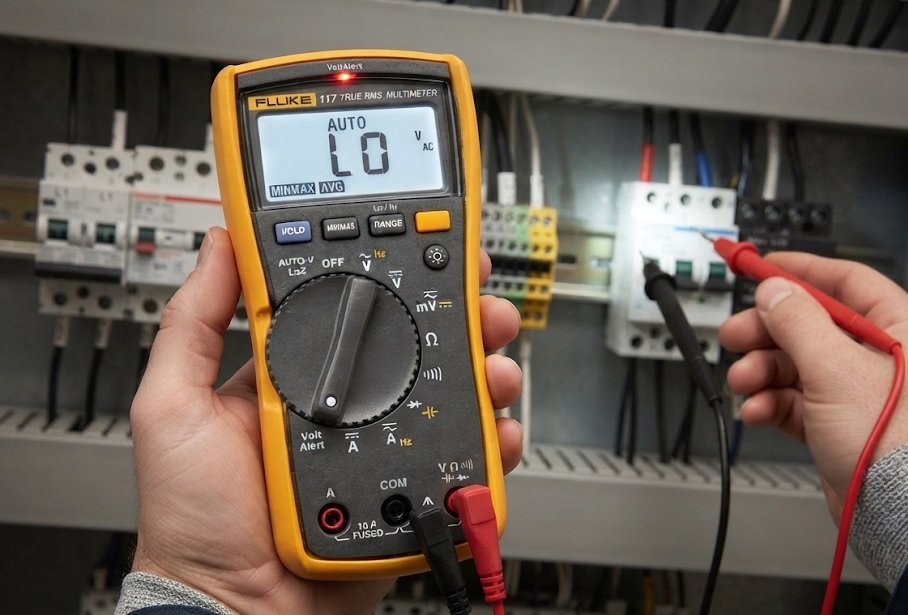
Fluke 117 Electrician’s Multimeter — Best Overall Choice
The Fluke 117 delivers true-RMS accuracy with 0.5% DC voltage tolerance, making it the recommended pick for precise LiFePO4 cell checks. Its non-contact voltage detection and backlit display simplify work in dim battery enclosures. Ideal for professionals who need reliable, repeatable readings across every cell in a pack.
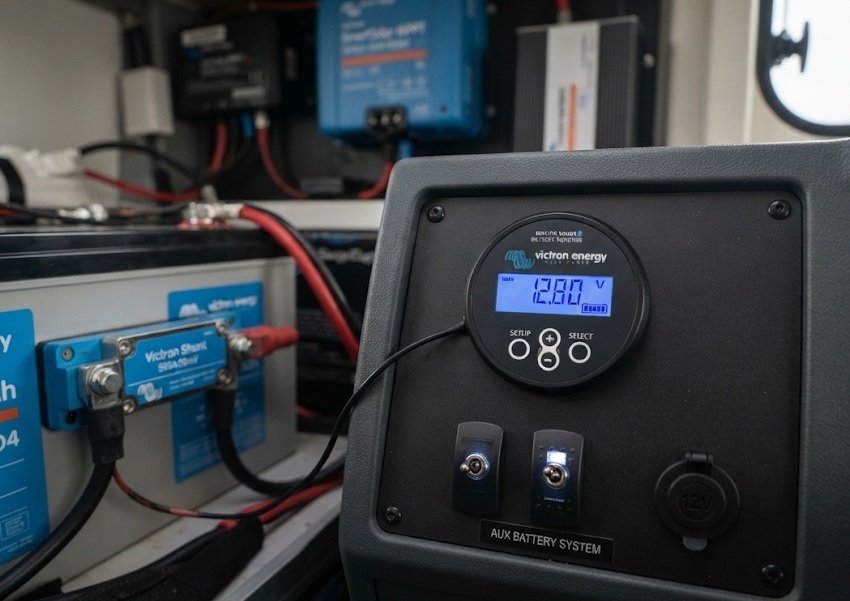
Victron Energy BMV-712 Smart Battery Monitor — Best for Pack-Level Insight
The Victron BMV-712 tracks state of charge, voltage, and current in real time via Bluetooth. It is the best option for solar and off-grid systems where per-cell voltage matters less than overall pack behavior. Midpoint monitoring also flags imbalance early, protecting your LiFePO4 investment.
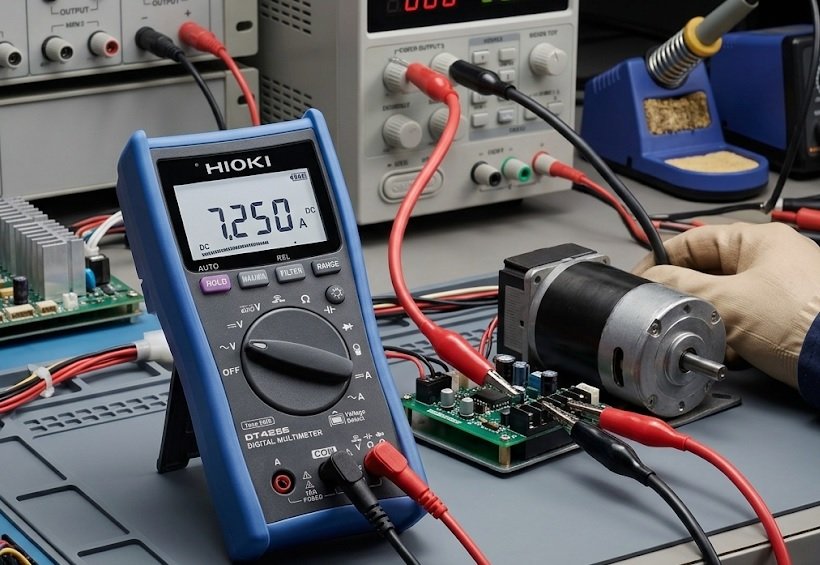
HIOKI DT4256 Digital Multimeter — Best Budget-Friendly Option
The HIOKI DT4256 offers 0.3% DC accuracy at a fraction of premium prices. It is ideal for hobbyists checking individual 3.2V cells during top-balancing sessions. Compact, durable, and fast-sampling, it delivers trustworthy readings without overspending on lab-grade equipment.
Understanding 3.2V LiFePO4 Cell Voltage: What the Numbers Mean
A 3.2V LiFePO4 cell holds a nominal voltage that shifts with charge level. Reading it accurately reveals state of charge — but only under the right conditions.
Why 3.2V Is Nominal, Not Fixed
Lithium iron phosphate chemistry produces a remarkably flat discharge curve. That flatness is a strength for longevity and a challenge for voltage-based estimation.
- Full charge: ~3.4V resting (3.65V at cutoff)
- Nominal: 3.2V
- Empty: ~2.5V cutoff
Resting vs. Loaded Voltage Readings
Voltage sags under load and rebounds at rest. Always let a cell rest 1–2 hours before judging charge.
| Condition | Typical Reading |
|---|---|
| Resting, 100% | 3.40–3.45V |
| Resting, 50% | 3.30V |
| Under 1C load | Drops 0.1–0.3V |
State of Charge Reference Chart
Use this quick guide to translate resting voltage into approximate capacity.
- 3.40V+: 100%
- 3.30V: ~50%
- 3.20V: ~20%
- 3.00V: ~5%
Quick Tip
The 3.2V–3.3V plateau covers most capacity, so small voltage changes mean large charge differences. Measure at rest for accuracy.
How to Measure LiFePO4 Cell Voltage Accurately: Step-by-Step
Accurate readings depend on technique as much as tools. Follow these proven steps to get trustworthy numbers every time.
Step-by-Step Measurement Process
- Disconnect all loads and chargers. Any current flow skews the reading.
- Wait 1–2 hours. This lets the cell settle to its true resting voltage.
- Set your multimeter to DC volts. Choose the 20V range for single cells.
- Touch probes to the terminals. Red to positive, black to negative.
- Record the stable value. Ignore the first few fluctuating seconds.
Common Mistakes That Distort Readings
Even small errors produce misleading results. Watch for these frequent pitfalls.
- Measuring under load: Voltage sags 0.1–0.3V, faking a low charge.
- Reading too soon: Surface charge inflates voltage right after charging.
- Poor probe contact: Weak touch adds phantom resistance.
- Wrong range: Auto-range lag can mask true values.
Checking Cell Balance Across a Pack
Measure each cell individually and compare. A spread above 0.05V signals imbalance needing attention.
| Spread | Status | Action |
|---|---|---|
| <0.03V | Healthy | None |
| 0.03–0.05V | Monitor | Recheck soon |
| >0.05V | Imbalanced | Top-balance |
Remember
Rest first, measure at rest, and compare cells individually. Consistency beats precision for tracking pack health.
Interpreting 3.2V LiFePO4 Cell Voltage in Real-World Applications
Voltage readings mean different things across applications. Context determines whether a number is normal or alarming.
Solar and Off-Grid Storage Systems
Solar banks rarely rest, so loaded voltage runs lower than the chart suggests. Focus on trends over time rather than absolute values.
- Absorption phase: Cells climb to 3.55–3.65V.
- Float: Settles near 3.35V per cell.
- Overnight sag: A 0.05–0.1V drop is normal.
EV and DIY Battery Packs
In 12V or 48V packs, per-cell voltage reveals weak links. One lagging cell drags the entire string’s capacity.
| Pack Voltage | Cells (Series) | Nominal |
|---|---|---|
| 12V | 4S | 12.8V |
| 24V | 8S | 25.6V |
| 48V | 16S | 51.2V |
When Voltage Signals a Problem
Certain readings demand immediate action to prevent damage or safety risks.
- Below 2.5V: Over-discharge — recharge gently at low current.
- Above 3.65V: Overcharge — stop charging immediately.
- Rapid sag under light load: High internal resistance or aging.
- Cell stuck at 3.2V while others rise: Possible internal short.
Key Insight
Application context changes interpretation. Solar banks sag under load; EV packs reveal weak cells through spread. Always compare cells within the same pack.
Advanced Tips for Reading LiFePO4 Cell Voltage Like a Pro
Beyond the basics, professionals use several techniques to squeeze more insight from every reading.
Temperature Effects on Voltage Readings
Cold cells read lower; hot cells read higher. A cell at 0°C can appear 0.1V lower than at 25°C.
- Below 10°C: Expect depressed voltage and reduced capacity.
- 25°C: Reference temperature for all charts.
- Above 40°C: Inflated readings, faster aging.
Using Internal Resistance to Confirm Health
Voltage alone misses hidden degradation. Combine it with internal resistance (IR) for a fuller picture.
- Measure resting voltage.
- Apply a known 1C load for 10 seconds.
- Record voltage drop.
- Divide drop by current to estimate IR.
- Compare against the cell’s spec sheet.
Rising IR with stable voltage often signals early aging.
Logging Data for Long-Term Battery Tracking
Single readings are snapshots; trends reveal the real story. Log voltage weekly at the same conditions.
| Metric | Healthy Trend | Warning Sign |
|---|---|---|
| Resting voltage | Stable | Gradual decline |
| Cell spread | <0.03V | Widening |
| IR | Flat | Rising |
Pro Tip
Combine voltage, temperature, and internal resistance for a complete health picture. Track trends, not single readings.
LiFePO4 Voltage vs. Other Lithium Chemistries: Key Differences
LiFePO4 behaves differently from Li-ion and LiPo. Knowing these differences prevents misreading voltage data.
Nominal Voltage Comparison
Each chemistry has its own voltage signature. Applying the wrong chart leads to false conclusions.
| Chemistry | Nominal | Full | Empty |
|---|---|---|---|
| LiFePO4 | 3.2V | 3.65V | 2.5V |
| Li-ion (NMC) | 3.7V | 4.2V | 3.0V |
| LiPo | 3.7V | 4.2V | 3.0V |
| LTO | 2.4V | 2.8V | 1.5V |
Why LiFePO4 Has a Flatter Discharge Curve
LiFePO4 holds voltage steady across most of its capacity. This flatness boosts cycle life but complicates voltage-based state-of-charge estimates.
- Flat plateau: 3.2V–3.3V covers ~80% of capacity.
- Steep endpoints: Voltage drops fast near empty.
- Result: Small voltage changes mean big capacity shifts.
Safety and Cycle Life Advantages
LiFePO4 tolerates abuse that would destroy other chemistries. This durability makes voltage monitoring less critical — but still valuable.
- Thermal stability: Resists runaway better than NMC.
- Cycle life: 2,000–5,000 cycles vs. 500–1,000 for NMC.
- Voltage tolerance: Handles wider charge windows safely.
Bottom Line
Never apply Li-ion voltage charts to LiFePO4 cells. The 3.2V nominal and flat curve demand chemistry-specific interpretation.
Frequently Asked Questions About 3.2V LiFePO4 Cell Voltage
These quick answers address the most common questions readers ask about LiFePO4 voltage readings.
What Voltage Is a 3.2V LiFePO4 Cell Fully Charged?
A fully charged LiFePO4 cell rests at 3.40–3.45V after settling. Charging cutoff sits at 3.65V, but that surface charge fades within an hour or two.
Is 3.2V a Good Reading for a LiFePO4 Cell?
Yes — 3.2V is the nominal voltage and indicates roughly 20–30% state of charge at rest. It is a normal, healthy mid-range reading, not a sign of trouble.
What Is the Minimum Safe Voltage for LiFePO4?
Never discharge below 2.5V per cell. Many BMS units cut off at 2.8–3.0V to preserve cycle life and prevent permanent damage.
Why Does My LiFePO4 Cell Read 3.2V Under Load?
Voltage sag under current draw is normal. A cell reading 3.2V under load may rest at 3.3V or higher once the load is removed.
How Do I Know If My LiFePO4 Cell Is Bad?
Watch for these warning signs:
- Rapid voltage drop under light loads.
- Won’t hold charge above 3.0V after resting.
- Wide spread versus other cells in the pack.
- Swelling or heat during charge or discharge.
Quick Reference
Full: 3.4V+ · Nominal: 3.2V · Empty: 2.5V. Always measure at rest for accurate state-of-charge estimates.
Tools and Equipment for Accurate LiFePO4 Voltage Testing
The right gear makes voltage readings reliable and repeatable. Here is what professionals keep on hand.
Essential Measurement Tools
Start with a quality multimeter, then add specialized instruments as your needs grow.
- Digital multimeter: 0.5% DC accuracy minimum for cell work.
- Battery monitor: Tracks state of charge and current continuously.
- Cell voltage tester: Speeds up multi-cell pack checks.
- Clamp meter: Measures current without breaking the circuit.
Choosing the Right Multimeter for LiFePO4 Cells
Not all multimeters handle low-voltage DC well. Prioritize these features before buying.
- DC voltage range: Must cover 0–20V with fine resolution.
- Accuracy rating: Look for ±0.5% or better.
- True RMS: Ensures clean readings on noisy systems.
- Input impedance: 10MΩ prevents circuit loading.
- Auto-ranging: Speeds up repetitive cell checks.
Accessories That Improve Measurement Accuracy
Small add-ons reduce errors and protect your equipment.
| Accessory | Benefit |
|---|---|
| Alligator clips | Hands-free, stable contact |
| Kelvin probes | Eliminates lead resistance |
| Insulated gloves | Safety on live packs |
| Calibration checker | Verifies meter accuracy |
Buyer’s Tip
A 0.5%-accurate multimeter with 10MΩ impedance covers 95% of LiFePO4 testing needs. Add a battery monitor for continuous pack tracking.
Conclusion: Mastering 3.2V LiFePO4 Cell Voltage Readings
Reading 3.2V LiFePO4 cell voltage accurately protects your battery and extends its life. You now have the charts, tools, and techniques to interpret every number with confidence.
Always measure at rest, compare cells within the same pack, and track trends over time. Consistency matters more than precision.
Grab your multimeter and test your pack today. Apply these proven methods and watch your battery knowledge grow.
With practice, voltage readings become second nature — and your LiFePO4 cells will thank you with years of reliable service.
Frequently Asked Questions About Reading 3.2V LiFePO4 Cell Voltage
What is the best way to check LiFePO4 cell voltage accurately?
Disconnect all loads and chargers, then wait one to two hours before measuring. This lets the cell settle to its true resting voltage instead of a misleading loaded or surface-charge value.
Use a multimeter with at least 0.5% DC accuracy and 10MΩ input impedance. Touch probes firmly to the terminals and record the stable reading after fluctuations stop.
Why does my LiFePO4 cell read 3.2V but seem fully charged?
3.2V is the nominal voltage, not full charge. A fully charged LiFePO4 cell rests near 3.40–3.45V once surface charge fades, so 3.2V typically means roughly 20–30% state of charge.
If the cell was just charged, surface charge may have already dissipated. Recheck after a full rest period and compare against a proper state-of-charge chart.
How do I know if my LiFePO4 cell voltage is too low?
Anything below 2.5V per cell signals over-discharge and risks permanent damage. Most BMS units cut off between 2.8V and 3.0V to protect the cell from harm.
If a cell reads below 2.5V, recharge it gently at a low current like 0.1C. Monitor closely for swelling or heat, which indicate the cell may be unrecoverable.
What voltage spread between LiFePO4 cells is acceptable?
A spread under 0.03V is healthy, while 0.03–0.05V warrants monitoring. Anything above 0.05V signals imbalance that needs correction through top-balancing.
Measure each cell individually at rest for the most accurate comparison. Consistent imbalance usually points to a weak or aging cell in the pack.
How does temperature affect LiFePO4 cell voltage readings?
Cold cells read lower and hot cells read higher than their true state. A cell at 0°C can appear about 0.1V lower than the same cell at 25°C.
Always reference charts at 25°C and note ambient temperature when logging readings. Temperature swings explain many apparent voltage anomalies.
Can I estimate state of charge from LiFePO4 voltage alone?
Only roughly, because the 3.2V–3.3V plateau covers most capacity. Small voltage changes there represent large state-of-charge differences, limiting accuracy.
For precise tracking, combine voltage with a coulomb-counting battery monitor. This is the best way to get reliable state-of-charge data on LiFePO4 systems.
What should I do if one cell in my pack reads much lower than the rest?
First, confirm the reading at rest with a calibrated meter. If the cell remains low, top-balance the pack or charge that cell individually to match the others.
If the cell keeps drifting low after balancing, it likely has high internal resistance or reduced capacity. Consider replacing it to protect overall pack performance.
Which multimeter settings work best for testing 3.2V LiFePO4 cells?
Set your meter to DC volts and choose the 20V range for single cells. Auto-ranging works fine, but manual range reduces lag on fluctuating readings.
Enable true RMS if available for cleaner results on noisy systems. Verify calibration periodically so your LiFePO4 voltage readings stay trustworthy over time.