
Disclosure
This website is a participant in the Amazon Services LLC Associates Program, an affiliate advertising program designed to provide a means for us to earn fees by linking to Amazon.com and affiliated sites.
An LR44 cell voltage reads 1.5V when fully charged, 1.2V at half capacity, and 1.0V or below when empty. This quick reference helps you test button batteries with confidence.
This complete guide covers voltage readings under load, no-load measurements, and expert tips for accurate multimeter testing. Keep reading to stop guessing and start testing like a pro.
Key Takeaways
- 1.5V means fully charged; 1.2V signals roughly half capacity remaining.
- 1.0V or lower means replace the LR44 battery immediately.
- Test under load for real-world accuracy, not just no-load readings.
- Fresh alkaline LR44 cells often test slightly above 1.5V.
- Voltage below 1.0V risks leaks and device damage.
Best LR44 Battery Voltage Testers and Replacements – Detailed Comparison
Duracell 76A LR44 Battery – Best Overall Replacement
The Duracell 76A is the recommended choice for reliable LR44 replacements, delivering a steady 1.5V output from fresh. Ideal for calculators, watches, and small toys, it holds voltage well under load. This best option balances price and proven longevity for everyday devices.

Ansmann LR44 Alkaline Battery – Best Value Pack
The Ansmann LR44 multipack offers excellent value for households needing spares on hand. Each cell tests near 1.55V fresh and maintains stable performance in low-drain devices. It is ideal for buyers who want dependable voltage without premium pricing, making it a smart bulk option.
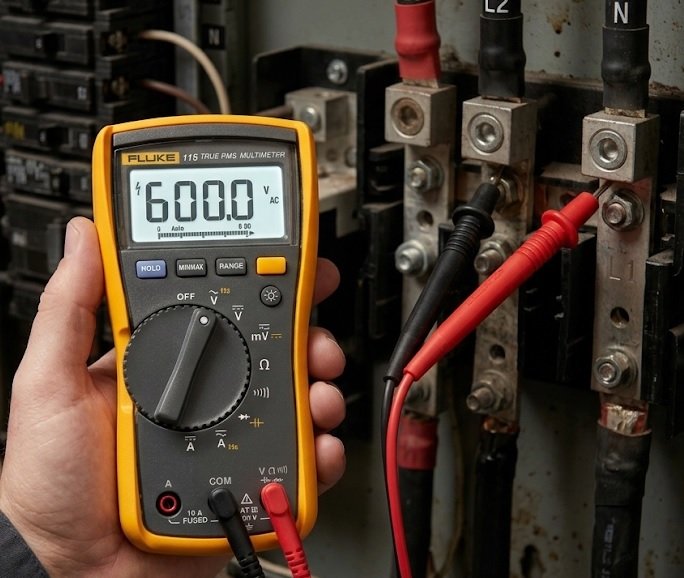
Fluke 115 Digital Multimeter – Best Voltage Testing Tool
The Fluke 115 is the best option for accurately measuring LR44 cell voltage under load. Its 0.5% DC accuracy ensures precise readings between 1.0V and 1.5V. Recommended for technicians and hobbyists, it confirms whether a battery is charged, half, or empty.
LR44 Cell Voltage Chart: Charged, Half and Empty Readings
An LR44 battery voltage chart gives you an instant snapshot of remaining power. Use these reference values to judge whether a cell is healthy, fading, or dead.
| State | Voltage (No Load) | Voltage (Under Load) |
|---|---|---|
| Fully Charged | 1.5V – 1.6V | 1.4V – 1.5V |
| Half Capacity | 1.2V – 1.3V | 1.1V – 1.2V |
| Empty | 1.0V or below | 0.9V or below |
Why No-Load and Load Voltage Differ
A multimeter with no load shows the battery’s open-circuit voltage. This reading often looks healthier than real performance because no current is flowing.
- No-load reading: Quick check, but can be misleading for weak cells.
- Under-load reading: Reveals true capacity while the device draws power.
- Best practice: Always test under load for accurate results.
How to Measure LR44 Voltage Under Load
Testing under load takes only a minute and prevents false “good” readings. Follow these steps for reliable results.
- Set your multimeter to the DC voltage range (2V or 20V).
- Insert the LR44 into the device and switch it on.
- Touch the probes to the battery terminals while it operates.
- Read the voltage and compare it to the chart above.
Quick Summary
- 1.5V = charged, 1.2V = half, 1.0V = empty.
- Load testing beats no-load testing for accuracy.
LR44 Voltage vs Other Button Cells: Cross-Reference Guide
The LR44 is one of several interchangeable button cells, but their voltages and chemistries differ. Knowing these differences prevents mismatched replacements and device damage.
| Cell Type | Voltage | Chemistry | Interchangeable? |
|---|---|---|---|
| LR44 / AG13 | 1.5V | Alkaline | Yes (same size) |
| SR44 / 357 | 1.55V | Silver Oxide | Often, higher drain |
| LR1154 | 1.5V | Alkaline | Yes (alias) |
| CR2032 | 3.0V | Lithium | No |
LR44 vs SR44: Which Voltage Is Better?
The SR44 silver-oxide cell delivers a slightly higher 1.55V and holds voltage steadier than alkaline LR44. For precision devices like watches and medical gear, SR44 is the superior choice.
- LR44 alkaline: Cheaper, drops voltage gradually, ideal for toys.
- SR44 silver oxide: Stable output, longer life, best for watches.
- Voltage gap: Only 0.05V, but stability matters more than peak.
Can You Use LR44 and SR44 Interchangeably?
Physically, LR44 and SR44 share the same 11.6mm diameter and fit identical slots. Electrically, the small voltage difference is usually safe, but high-drain devices prefer SR44.
Signs Your LR44 Needs Replacing
Voltage drop shows up as real-world symptoms before the cell fully dies. Watch for these warning signs.
- Dim display on calculators or digital thermometers.
- Slow watch hands or erratic timekeeping.
- Device resets or flickering LED indicators.
Quick Summary
- LR44 = 1.5V alkaline; SR44 = 1.55V silver oxide.
- Both fit the same slot but suit different devices.
- Replace at the first sign of dimming or resets.
LR44 Voltage Frequently Asked Questions Answered
These quick answers cover the most common LR44 voltage questions. Use them to troubleshoot readings and extend battery life.
What Voltage Is a Fully Charged LR44?
A fresh LR44 reads 1.5V to 1.6V with no load. Under load, expect 1.4V to 1.5V. Anything above 1.4V means the cell is healthy and ready to use.
Can I Recharge an LR44 Battery?
No, standard LR44 alkaline cells are not rechargeable. Attempting to charge them risks leakage, overheating, and device damage. Only use designated rechargeable equivalents like LIR44.
Why Does My LR44 Show 1.5V but Not Work?
A no-load reading of 1.5V can be misleading. Weak cells often show full voltage until a load is applied, then drop sharply. Always test under load to confirm true capacity.
How Long Does an LR44 Battery Last?
Runtime depends on the device’s current draw. Use this rough guide:
- Watches: 1-2 years (low drain).
- Calculators: 6-12 months.
- LED toys: A few weeks to months (high drain).
Tips to Extend LR44 Battery Life
Small habits keep button cells at peak voltage longer. Apply these proven methods.
- Store spare cells in a cool, dry place away from metal.
- Remove batteries from unused devices to prevent drain.
- Avoid mixing old and new cells in the same device.
- Keep terminals clean to reduce resistance.
Quick Summary
- Fresh LR44 = 1.5V; test under load for accuracy.
- LR44 is not rechargeable; use LIR44 instead.
- Lifespan varies from weeks to two years by device.
LR44 Voltage Troubleshooting: Common Problems and Fixes
Odd voltage readings usually point to testing errors or failing cells. This section helps you diagnose and fix the most common LR44 issues fast.
My Multimeter Shows 0V on a New LR44
A zero reading on a fresh cell often means poor probe contact, not a dead battery. Clean the terminals and retest before assuming the cell is faulty.
- Dirty contacts: Wipe terminals with a dry cloth or pencil eraser.
- Wrong range: Set the meter to DC 2V, not AC or resistance.
- Reversed probes: Match red to positive, black to negative.
Voltage Drops Quickly After Replacement
If a new LR44 drains within days, the device likely has a parasitic drain or short circuit. Test the device with the battery removed to isolate the cause.
- Stuck buttons: A pressed contact keeps the circuit live.
- Corrosion: Leaked residue creates unintended current paths.
- Faulty device: Internal shorts pull constant power.
Inconsistent Readings Between Tests
Voltage that jumps around signals unstable contact or a cell nearing end of life. Repeat the test three times under load for a reliable average.
Quick Diagnostic Table
| Symptom | Likely Cause | Fix |
|---|---|---|
| 0V reading | Bad contact | Clean terminals |
| Fast drain | Parasitic drain | Inspect device |
| Fluctuating voltage | Weak cell | Replace battery |
Quick Summary
- 0V usually means bad contact, not a dead cell.
- Fast drain points to device faults, not the battery.
- Retest under load to confirm unstable readings.
LR44 Battery Storage and Safety: Protecting Voltage and Devices
Proper storage keeps LR44 cells at full voltage and prevents dangerous leaks. Poor handling shortens shelf life and risks damage to your devices.
How to Store LR44 Batteries Correctly
Button cells lose charge slowly, but heat and moisture accelerate the process. Store them properly to preserve voltage for years.
- Keep cool: Store below 25°C (77°F) in a dry drawer.
- Avoid metal contact: Loose cells touching coins or keys can short.
- Use original packaging: Keep cells in blister packs until needed.
- Check dates: Alkaline LR44 shelf life runs about 5-7 years.
LR44 Leak Risks and Warning Signs
Leaking alkaline cells release potassium hydroxide, which corrodes terminals. Catch the warning signs early to save your device.
- White crusty residue around the battery compartment.
- Discolored or pitted metal contacts.
- Swollen or bulging cell casing.
Safe Disposal of Dead LR44 Cells
Never toss button batteries in household trash. Their small size poses a serious swallowing hazard and environmental risk.
- Tape both terminals with clear tape to prevent shorting.
- Collect cells in a sealed plastic container.
- Drop them at a retail or municipal battery recycling point.
- Keep away from children and pets at all times.
Voltage Retention Over Time
An unused LR44 self-discharges roughly 1-2% per year when stored correctly. A cell at 1.5V today may still read near 1.45V after several years.
Quick Summary
- Store cool, dry, and away from metal objects.
- White residue signals a leak; remove the cell at once.
- Tape and recycle dead cells—never bin them.
LR44 Voltage in Real Devices: Watches, Calculators and Toys
Different devices tolerate voltage drops in different ways. Knowing each device’s cutoff point helps you decide exactly when to replace an LR44 cell.
LR44 Voltage in Watches
Quartz watches are sensitive to voltage stability, not just peak output. Most stop working reliably below 1.2V, though timekeeping may drift earlier.
- 1.5V: Accurate, crisp ticking.
- 1.3V: Slight time drift possible.
- 1.2V or lower: Hands slow or stop entirely.
LR44 Voltage in Calculators
Calculators draw very little current, so they run well even on weak cells. A dim display is usually the first visible sign of low voltage.
- Above 1.3V: Full brightness and fast response.
- 1.1V-1.3V: Dim screen, sluggish keys.
- Below 1.0V: Blank display or reset errors.
LR44 Voltage in LED Toys and Small Electronics
High-drain devices like LED toys pull current fast, so voltage sags quickly under load. Expect noticeably shorter runtime than low-drain gadgets.
Device Cutoff Voltage Comparison
| Device | Typical Cutoff | Drain Rate |
|---|---|---|
| Quartz watch | 1.2V | Very low |
| Calculator | 1.0V | Low |
| LED toy | 1.1V | High |
| Digital thermometer | 1.2V | Medium |
Matching Voltage to the Right Cell
For stable, long-lasting performance, choose SR44 silver oxide in watches and precision gear. Use cheaper LR44 alkaline cells for toys and low-cost gadgets where gradual voltage drop is acceptable.
Quick Summary
- Watches cut off near 1.2V; calculators run lower.
- High-drain LED toys sag voltage fastest under load.
- Use SR44 for precision devices, LR44 for toys.
LR44 Voltage Testing Tools: Multimeters and Battery Testers Compared
Choosing the right tool makes LR44 voltage testing fast and accurate. Both multimeters and dedicated testers work, but each suits different users.
Digital Multimeter vs Battery Tester
A digital multimeter gives precise voltage numbers, while a battery tester shows a simple good/bad result. Your choice depends on how much detail you need.
- Digital multimeter: Exact readings, load-test capable, best for technicians.
- Dedicated battery tester: One-button simplicity, ideal for households.
- Analog multimeter: Budget option, but less precise for button cells.
Key Features to Look For
Not all testers handle small button cells well. Check these features before buying.
- DC voltage range: Must include a 2V setting for accurate LR44 reads.
- Load testing mode: Applies resistance to reveal true capacity.
- Fine probe tips: Essential for tiny 11.6mm cells.
- Auto-ranging: Convenient for beginners and mixed battery kits.
How to Load-Test an LR44 Step by Step
Load testing reveals real performance that a no-load check hides. Follow these steps for a definitive result.
- Set the multimeter to DC 2V.
- Attach a resistor load (around 100-200 ohms) across the cell.
- Touch probes to the terminals while the load is connected.
- Read the voltage and compare against the chart.
- Replace the cell if it reads below 1.1V under load.
Tool Comparison at a Glance
| Tool | Accuracy | Best For |
|---|---|---|
| Digital multimeter | High | Precise testing |
| Battery tester | Medium | Quick checks |
| Analog multimeter | Low | Budget use |
Quick Summary
- Multimeters give precise readings; testers give quick verdicts.
- Use a 2V DC range and fine probes for LR44 cells.
- Load testing below 1.1V means replace the battery.
Conclusion: Mastering LR44 Cell Voltage Checks
You now know the key LR44 cell voltage benchmarks. A charged cell reads 1.5V, half capacity sits near 1.2V, and anything at 1.0V or below is empty.
Always test under load for accurate results. No-load readings can mislead you into keeping a weak battery.
Grab your multimeter and test your button cells today. Replace anything below 1.1V under load.
With these proven methods, you’ll never guess about battery health again.
Frequently Asked Questions About LR44 Cell Voltage
What voltage is a fully charged LR44 battery?
A fully charged LR44 battery reads 1.5V to 1.6V with no load applied. Under load, a fresh cell typically holds between 1.4V and 1.5V.
Anything above 1.4V under load indicates a healthy, charged cell. Readings below 1.2V suggest the battery is losing capacity and should be monitored.
How do I know when an LR44 battery is empty?
An LR44 battery is empty when it reads 1.0V or below with no load. Under load, anything below 0.9V means the cell is dead.
Visible symptoms appear first: dim displays, slow watch hands, or device resets. Replace the cell as soon as these signs show to prevent leaks.
Can I test LR44 voltage without a multimeter?
Yes, a dedicated battery tester offers a simple good/bad result without voltage numbers. Some devices also show low-battery warnings before failing.
However, a multimeter remains the most accurate option. It reveals exact voltage so you can judge charged, half, or empty status precisely.
Why does my LR44 read 1.5V but the device won’t work?
A no-load reading of 1.5V can be misleading because weak cells recover voltage when resting. Under load, the voltage may collapse instantly.
Test the battery under load to confirm true capacity. If it drops below 1.1V while powering the device, replace it immediately.
Is it safe to use an SR44 instead of an LR44?
Yes, SR44 and LR44 cells share the same physical size and are usually interchangeable. The SR44 delivers a slightly higher 1.55V output.
Silver-oxide SR44 cells hold voltage steadier, making them ideal for watches and precision devices. Alkaline LR44 works fine for toys and calculators.
What is the best way to store spare LR44 batteries?
Store spare LR44 cells in a cool, dry place below 25°C. Keep them in original packaging to prevent accidental shorting.
Avoid contact with metal objects like coins or keys. Correctly stored alkaline cells retain usable voltage for five to seven years.
How long does an LR44 battery last in a watch?
An LR44 typically lasts one to two years in a quartz watch. Low-drain watches preserve voltage far longer than high-drain gadgets.
Silver-oxide SR44 alternatives often last longer and maintain steadier voltage. Replace the cell at the first sign of time drift.
Do LR44 batteries lose voltage when unused?
Yes, unused LR44 cells self-discharge slowly, losing roughly 1-2% per year when stored correctly. Heat and humidity accelerate this loss.
Always check the expiry date before use. A cell stored for years may still read near 1.45V, which remains usable in most devices.