
Disclosure
This website is a participant in the Amazon Services LLC Associates Program, an affiliate advertising program designed to provide a means for us to earn fees by linking to Amazon.com and affiliated sites.
If your wireless earbud case isn’t charging, the culprit is usually a dirty charging port, faulty cable, or worn-out battery. This frustrating issue has simple fixes you can try at home in minutes.
This complete guide covers the most common reasons your case won’t charge and proven methods to restore power fast. Keep reading for expert tips to get your earbuds back in action today.
Key Takeaways
- 90% of charging failures trace back to dirty ports, bad cables, or poor outlet connections.
- Clean the case’s metal contacts with isopropyl alcohol before assuming the battery is dead.
- Test the case with a different cable, adapter, and power source to isolate the fault.
- Blinking red or no LED light usually signals a deep battery drain or hardware failure.
- Most manufacturer warranties cover battery defects for 12 months, so check before replacing.
Best Wireless Earbud Cases for Reliable Charging – Detailed Comparison
Apple AirPods Pro (2nd Generation) Charging Case – Best Overall Choice
The Apple AirPods Pro 2nd Gen case (model A2968) is the recommended pick for iPhone users. It supports MagSafe, Qi wireless, and USB-C charging, plus an Apple Watch charger. The built-in speaker and Precision Finding make locating a lost case effortless. Ideal for anyone wanting dependable, versatile charging.

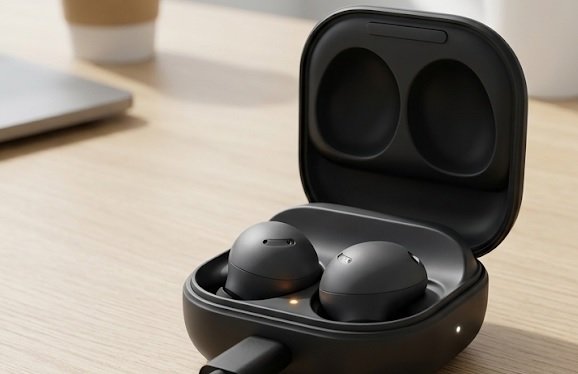
Samsung Galaxy Buds2 Pro Charging Case – Best for Android Users
The Samsung Galaxy Buds2 Pro case (model SM-R510) is the best option for Android owners. It delivers fast USB-C and Qi wireless charging with a compact, grippy design. Its 500mAh battery provides up to 29 hours of total playtime. Perfect for Galaxy users seeking seamless ecosystem integration and consistent power.
Anker Soundcore Liberty 4 NC Case – Best Budget Pick
The Anker Soundcore Liberty 4 NC case (model A3947) is ideal for budget-conscious buyers. It offers USB-C and wireless charging with a 100-hour total battery capacity. Anker’s 18-month warranty and proven reliability make it a smart, affordable alternative to premium brands. Great for everyday commuters and travelers.

Common Reasons Your Wireless Earbud Case Won’t Charge
Most charging failures come down to a handful of fixable problems. Identifying the exact cause saves you money and time before replacing anything.
Dirty or Damaged Charging Contacts
Lint, dust, and earwax block the metal contacts inside the case. This prevents power from reaching the battery.
- Pocket lint: Accumulates in the port and blocks contact pins.
- Corrosion: Sweat and moisture oxidize the metal surfaces.
- Bent pins: Forced cables damage the internal connector.
Faulty Cable, Adapter, or Power Source
A dead cable or weak adapter is the second most common culprit. Always test with a known working charger first.
- Cable damage: Frayed wires stop current flow silently.
- Weak adapter: Low-wattage bricks charge too slowly to register.
- Bad outlet: A dead USB port mimics a broken case.
Battery or Firmware Problems
Deep battery drain and outdated firmware can also stop charging. A fully depleted cell may need 30 minutes before responding.
Quick Diagnosis Checklist
- Inspect and clean contacts with isopropyl alcohol.
- Swap the cable, adapter, and outlet one at a time.
- Wait 30 minutes after a full battery drain.
- Update firmware through the companion app.
Once you’ve ruled out these common causes, you can move on to targeted fixes.
How to Fix a Wireless Earbud Case That Isn’t Charging
Once you’ve identified the likely cause, these step-by-step fixes resolve most charging problems at home. Work through them in order for the fastest results.
Step-by-Step Cleaning and Reset Process
Start with the simplest fix: a thorough clean. Dirt on the contacts is the leading cause of charging failure.
- Power off the case and remove both earbuds.
- Dip a cotton swab in isopropyl alcohol and wipe the metal pins.
- Clean the USB-C port gently with a dry toothpick.
- Let it dry for 10 minutes before recharging.
- Perform a factory reset using the manufacturer’s button combination.
Testing Cables, Adapters, and Wireless Pads
Hardware faults are easy to miss, so test each component separately. This isolates the broken part quickly.
- Cable: Try a different USB-C or Lightning cord.
- Adapter: Use a 20W or higher wall brick.
- Outlet: Plug into another USB port or power strip.
- Wireless pad: Reposition the case over the charging coil.
When to Seek Warranty or Professional Repair
If cleaning and testing fail, the internal battery or charging IC may be faulty. Most brands cover battery defects for 12 months.
Fix Priority Order
- Clean contacts and port first.
- Swap cable, adapter, and outlet next.
- Reset firmware before contacting support.
- Claim warranty within 12 months if unresolved.
With these fixes applied, most cases return to normal charging within minutes.
Preventing Future Wireless Earbud Case Charging Problems
Good charging habits extend your case’s lifespan and prevent repeat failures. A few simple routines keep the battery healthy for years.
Proper Charging Habits and Storage Tips
How you charge and store your case matters more than you think. Follow these habits to avoid long-term damage.
- Avoid overcharging: Unplug once the case reaches 100%.
- Keep it cool: Heat above 35°C degrades battery cells.
- Store dry: Moisture causes corrosion on contacts.
- Use original accessories: Cheap chargers deliver unstable voltage.
Choosing the Right Charger and Cable
Mismatched chargers are a hidden cause of slow or failed charging. Match your cable and adapter to the manufacturer’s specs.
| Charger Type | Recommended Wattage | Best For |
|---|---|---|
| USB-C wired | 20W or higher | Fast daily charging |
| Qi wireless pad | 5-10W | Convenient desk use |
| MagSafe | 15W | Apple AirPods models |
Routine Maintenance Schedule
Regular upkeep stops small issues from becoming costly repairs. Set a monthly reminder to inspect your case.
- Weekly: Wipe earbuds and case contacts.
- Monthly: Inspect the USB-C port for debris.
- Quarterly: Test charging speed and cable condition.
- Yearly: Check battery health in the companion app.
Prevention Essentials
- Charge with matched, quality accessories.
- Keep the case cool, dry, and debris-free.
- Clean contacts weekly, inspect monthly.
Consistent care dramatically reduces the odds of another charging failure.
When to Repair or Replace Your Wireless Earbud Case
Sometimes a charging case is beyond a simple fix. Knowing when to repair versus replace saves you money and frustration.
Signs Your Charging Case Is Beyond Saving
Certain symptoms point to permanent hardware failure. Watch for these warning signs before spending on repairs.
- No LED light after 30 minutes on a working charger.
- Physical swelling of the case or battery bulge.
- Burning smell or unusual heat during charging.
- Case won’t hold charge for more than an hour.
Repair vs. Replacement Cost Comparison
Weighing repair costs against a new case helps you decide fast. The table below shows typical price ranges.
| Option | Typical Cost | Best When |
|---|---|---|
| Battery replacement | $25-$50 | Case is under warranty |
| Port repair | $30-$60 | Contacts or pins damaged |
| Replacement case | $50-$100 | Multiple faults present |
| Full new earbuds | $100-$250 | Case discontinued |
Checking Your Warranty Before You Buy
Most brands cover battery defects for 12 months from purchase. Always check coverage before paying for repairs.
- Apple: 1-year limited warranty plus AppleCare+ options.
- Samsung: 1-year warranty on cases and batteries.
- Anker Soundcore: 18-month warranty with registration.
Repair or Replace?
- Swelling, burning smells, or no LED mean replace it.
- Warranty coverage makes repair the smart first step.
- Multiple faults usually favor full replacement.
Armed with these guidelines, you can choose the most cost-effective path forward.
Brand-Specific Wireless Earbud Case Charging Issues
Different brands have unique charging quirks and known faults. Matching your fix to your model speeds up troubleshooting considerably.
Apple AirPods Case Not Charging
AirPods cases often fail due to dirty Lightning ports or MagSafe misalignment. A quick reset usually restores normal charging.
- Reset: Hold the setup button 15 seconds until the LED flashes amber.
- MagSafe: Center the case precisely on the magnetic coil.
- Lightning port: Clean lint gently with a wooden toothpick.
Samsung Galaxy Buds Charging Problems
Galaxy Buds cases sometimes stop charging after firmware glitches. The Galaxy Wearable app helps diagnose and resolve these issues.
- Firmware: Update through Galaxy Wearable regularly.
- Wireless pad: Remove thick phone cases that block coils.
- Reset: Reinsert both buds and close the lid for 10 seconds.
Anker, JBL, and Other Budget Brands
Budget cases frequently suffer from weak USB-C ports and cheap batteries. Gentle handling and quality cables extend their life.
| Brand | Common Issue | Quick Fix |
|---|---|---|
| Apple | Dirty Lightning port | Clean + reset |
| Samsung | Firmware glitch | Update app |
| Anker | Loose USB-C port | Swap cable |
| JBL | Weak battery | Claim warranty |
Brand Fix Cheat Sheet
- Apple: clean the Lightning port, then reset.
- Samsung: update firmware via the Wearable app.
- Budget brands: swap cables and check warranty.
Knowing your brand’s specific quirks turns guesswork into a fast, targeted fix.
Advanced Troubleshooting for Stubborn Charging Failures
When basic fixes fail, deeper diagnostics can uncover hidden causes. These advanced methods resolve rare but persistent charging problems.
Checking Battery Health and Cycle Count
Lithium-ion batteries degrade after roughly 500 charge cycles. Monitoring health reveals whether your case is simply worn out.
- iPhone: Check AirPods battery via the Settings widget.
- Android: Use the Galaxy Wearable or Soundcore app.
- Third-party tools: Apps like AccuBattery estimate capacity loss.
Firmware Updates and Factory Resets
Outdated firmware can block charging recognition entirely. A factory reset often clears software-related charging glitches.
- Update firmware through the official companion app.
- Unpair the earbuds from all connected devices.
- Reset the case using the manufacturer’s button combo.
- Re-pair and test charging again.
Environmental and Temperature Factors
Extreme temperatures trigger safety cutoffs that stop charging. Both cold and heat can prevent power from flowing.
| Condition | Effect on Charging | Solution |
|---|---|---|
| Below 0°C | Battery won’t accept charge | Warm to room temp |
| Above 35°C | Thermal protection activates | Cool before charging |
| High humidity | Contact corrosion | Dry thoroughly |
Advanced Fixes
- Check battery cycle count for wear.
- Update firmware and perform a factory reset.
- Charge only within safe temperature ranges.
These deeper steps catch the rare issues that standard troubleshooting misses.
Frequently Confused Charging Symptoms Explained
Not every charging problem means your case is broken. Some symptoms have simple explanations that mimic real faults.
Case Charges but Earbuds Don’t
If the case lights up but the earbuds stay dead, the issue is contact-related. Dirt on the earbud pins or case slots blocks the connection.
- Dirty earbud pins: Wipe with a dry cloth or alcohol swab.
- Misaligned seating: Press each bud firmly into its slot.
- Damaged slot pins: Bent pins require professional repair.
Slow Charging vs. Not Charging at All
Slow charging usually points to a weak adapter or cable. A complete failure suggests a dead battery or broken port.
| Symptom | Likely Cause | Fix |
|---|---|---|
| Charges slowly | Low-wattage adapter | Use 20W+ charger |
| Stops mid-charge | Loose cable connection | Replace cable |
| Never charges | Dead battery or port | Repair or replace |
Intermittent Charging and LED Confusion
Flickering LEDs and on-off charging signal a loose connection. Reseating the cable or cleaning the port often resolves it.
- Flickering LED: Loose port or cable.
- Red blinking light: Battery fault or deep drain.
- No light at all: No power reaching the case.
Symptom Quick Guide
- Case works but buds don’t: clean the contact pins.
- Slow charging: switch to a higher-wattage adapter.
- Blinking red LED: battery fault, check warranty.
Matching your symptom to the right cause prevents unnecessary repairs.
Conclusion: Fixing Your Wireless Earbud Case Charging Issue
A wireless earbud case that isn’t charging is usually fixable at home. Dirty contacts, bad cables, and firmware glitches cause most failures.
Clean the contacts first, then test your cable and adapter. These simple steps solve the majority of charging problems fast.
If nothing works, check your warranty before buying a replacement. Most brands cover battery defects for a full year.
With the right approach, your earbuds will be back to full power in no time. Start troubleshooting today and enjoy uninterrupted listening again.
Frequently Asked Questions About Wireless Earbud Case Charging
Why is my wireless earbud case not charging even when plugged in?
A plugged-in case that won’t charge usually has a dirty port or faulty cable. Lint blocks the contact pins, preventing power from reaching the battery.
Try cleaning the USB-C port with a dry toothpick and swapping the cable. If the LED still stays dark, test a different adapter and outlet to isolate the fault.
How do I know if my earbud case battery is dead?
A dead battery shows no LED light after 30 minutes on a working charger. The case may also feel unusually warm or fail to hold any charge.
Check battery health in your companion app if available. If capacity has dropped below 60%, the cell is worn out and likely needs replacement.
Can I charge my wireless earbud case with any USB-C cable?
Yes, most USB-C cables work, but quality matters. Cheap cables deliver unstable voltage and may charge slowly or not at all.
Use the original cable or a certified replacement rated for your case’s wattage. A 20W adapter paired with a quality cable ensures safe, fast charging.
What does a blinking red light on my earbud case mean?
A blinking red light typically signals a battery fault or deep discharge. The case may need 30 minutes of charging before responding normally.
If the red light persists after a full charge attempt, the battery has likely failed. Check your warranty, since most brands cover defects for 12 months.
How long should a wireless earbud case take to charge fully?
Most cases fully charge in one to two hours using a wired connection. Wireless charging takes longer, often two to three hours.
If charging exceeds four hours, your adapter or cable is likely too weak. Switch to a 20W or higher charger for faster results.
Is it safe to leave my earbud case charging overnight?
Modern cases have built-in overcharge protection, so overnight charging is generally safe. However, prolonged heat still degrades battery cells over time.
For best battery longevity, unplug once the case reaches 100%. Charge in a cool, well-ventilated spot away from direct sunlight.
How do I clean my earbud case charging contacts properly?
Dip a cotton swab in isopropyl alcohol and gently wipe the metal pins. Use a dry toothpick to remove lint from the USB-C port.
Let the case dry for 10 minutes before recharging. Clean contacts weekly to prevent corrosion and maintain reliable charging performance.
Should I repair or replace a case that won’t charge?
Repair makes sense if the case is under warranty or has a single fault. Replacement is smarter when multiple issues appear together.
Signs like swelling, burning smells, or no LED light mean replace immediately. Always check warranty coverage before paying for repairs.