
Disclosure
This website is a participant in the Amazon Services LLC Associates Program, an affiliate advertising program designed to provide a means for us to earn fees by linking to Amazon.com and affiliated sites.
Your battery capacity is lower than the label says because manufacturers list typical or maximum rated capacity, not the real-world usable energy your device delivers. Factors like temperature, age, and load shrink that number fast.
This complete guide reveals the proven methods to measure true capacity, explains why labels exaggerate, and shares expert tips to maximize runtime. Keep reading to stop guessing and start getting accurate numbers.
Key Takeaways
- 20–30% gap between labeled and real capacity is normal, not a defect.
- Manufacturers test at slow discharge rates and ideal 25°C temperatures.
- Battery age, heat, and fast charging permanently reduce usable capacity.
- Battery management systems reserve 5–10% to prevent deep discharge damage.
- Apps like AccuBattery measure true capacity through charge cycles.
Best Battery Capacity Testing Tools for Measuring Real Power – Detailed Comparison
AccuBattery Pro (Version 2.1.4) – Best Overall Choice
AccuBattery Pro is the recommended app for measuring true battery capacity through real charge cycles. It tracks design capacity versus actual mAh delivered, showing exactly how much your battery has degraded. The pro version removes ads and adds charge alarms. Ideal for Android users wanting precise, ongoing capacity data.

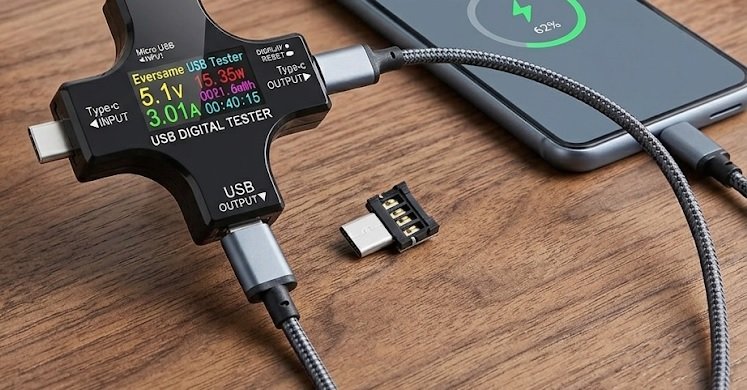
USB Power Meter Tester (Keweisi KWS-V20) – Best Hardware Option
The Keweisi KWS-V20 is the best option for hardware-based testing. This inline USB meter measures voltage, current, and total mAh during charging, revealing real capacity without software guesswork. It works with any USB device and costs under $15. Perfect for verifying manufacturer claims directly.
Anker 737 Power Bank (PowerCore 24K) – Best Reference Device
The Anker 737 PowerCore 24K is ideal for benchmarking labeled versus real capacity. Its 24,000mAh rated cell delivers roughly 14,000mAh usable output after conversion losses, demonstrating the label gap firsthand. A smart digital display shows exact input and output wattage. Excellent for understanding real-world capacity expectations.

Why Labeled Battery Capacity Differs From Real-World Usable Power
Manufacturers measure battery capacity under ideal lab conditions that rarely match daily use. Understanding these testing standards explains most of the gap you see.
How Manufacturers Rate Battery Capacity
Batteries are rated at a slow, steady discharge rate, often 0.2C. This means a 5,000mAh cell drains over five hours at a gentle 1,000mA load.
- Temperature: Testing happens at a perfect 25°C (77°F)
- Cutoff voltage: Cells discharge to a low endpoint you never reach
- Fresh cells: Ratings use brand-new, unaged batteries
The Real-World Capacity Loss Factors
Once a battery leaves the lab, several forces shrink usable capacity immediately.
- Conversion losses: Voltage conversion wastes 10–15% of stored energy
- BMS reserves: Battery management systems lock away 5–10% to prevent damage
- Heat and load: High drain rates and warm environments cut output further
Quick Summary
- Lab ratings use slow discharge at 25°C on fresh cells
- Conversion losses and BMS reserves remove 15–25% instantly
- Real usable capacity is typically 70–80% of the label
Labeled vs. Usable Capacity Comparison
| Factor | Labeled Rating | Real-World Use |
|---|---|---|
| Discharge rate | 0.2C (slow) | 1C+ (fast) |
| Temperature | 25°C ideal | Varies widely |
| Usable output | 100% | 70–80% |
These combined factors explain why your device rarely delivers the full number printed on the label.
How to Test If Your Battery Capacity Is Normal or Failing
You can verify whether your battery is healthy or genuinely degraded using a few proven methods. Each approach reveals different data about real capacity.
Step-by-Step Method to Measure True Battery Capacity
Follow this process to calculate actual usable capacity on any device.
- Drain fully: Use your device until it shuts down completely
- Charge to 100%: Use the original charger and cable
- Track input: Record total mAh delivered with a USB meter or app
- Compare: Divide measured mAh by the labeled rating
A result between 70–85% is normal. Anything below 60% signals significant degradation.
Signs Your Battery Is Actually Failing
Normal label gaps differ from true battery failure. Watch for these warning signs:
- Sudden shutdowns: Device dies at 20–30% remaining
- Rapid drain: Loses 10%+ within minutes of unplugging
- Physical swelling: A bulging battery is a safety hazard
- Overheating: Excessive heat during normal charging
Quick Summary
- 70–85% of labeled capacity is a healthy result
- Below 60% indicates real degradation
- Sudden shutdowns and swelling mean replace the battery
When to Replace vs. Accept the Gap
A moderate gap between labeled and usable capacity is unavoidable physics. However, a battery that shuts down early, swells, or overheats needs replacement.
If your measured capacity stays above 70% and performance is stable, the label gap is simply normal behavior—not a defect.
How to Maximize Usable Battery Capacity and Extend Lifespan
You cannot change physics, but you can slow capacity loss and squeeze more usable power from every charge. These habits deliver measurable results.
Daily Habits That Protect Real Battery Capacity
Small changes in charging behavior preserve capacity over hundreds of cycles.
- Stay between 20–80%: Avoid full charges and deep drains when possible
- Skip fast charging: Use standard chargers overnight, fast charge only when needed
- Keep it cool: Remove thick cases while charging and avoid direct sun
- Use original chargers: Cheap cables cause voltage spikes and heat
Settings That Reduce Power Draw
Lowering consumption makes your existing capacity stretch further each day.
- Enable battery saver: Limits background activity automatically
- Lower screen brightness: Displays are the largest single power drain
- Disable unused radios: Turn off Bluetooth, GPS, and Wi-Fi when idle
- Restrict background apps: Stop apps from waking the device constantly
Quick Summary
- Keeping charge between 20–80% doubles cycle life
- Heat is the number one killer of usable capacity
- Lower power draw stretches every remaining mAh
Long-Term Storage and Temperature Tips
Storing a battery at 100% in a hot car causes permanent capacity loss. For long-term storage, keep devices at 50% charge in a cool, dry place.
Following these proven methods keeps your real capacity closer to the label for years, not months.
Common Myths About Battery Capacity Labels Debunked
Misinformation about battery ratings spreads quickly online. Separating fact from fiction helps you judge your device fairly.
Myth 1: A Lower Reading Means a Fake Battery
Many users assume any gap between labeled and measured capacity proves counterfeiting. In reality, every legitimate battery shows a gap under real-world testing.
- Conversion losses: Voltage changes waste 10–15% of stored energy
- BMS reserves: Protection circuits lock away another 5–10%
- Load differences: Fast discharge always yields less than slow lab tests
Only a reading below 60% of the label, combined with other symptoms, suggests a counterfeit or failing cell.
Myth 2: You Can Recover Lost Capacity
Capacity loss from aging and heat is permanent and irreversible. No app, calibration trick, or charging ritual restores dead lithium ions.
- Calibration only fixes inaccurate percentage readings, not capacity
- Deep discharge cycles stress cells and accelerate further loss
- Freezer tricks risk condensation damage with zero real benefit
Quick Summary
- A capacity gap is normal, not proof of a fake battery
- Lost capacity from aging cannot be restored
- Calibration fixes readings, never actual mAh
Myth 3: Higher mAh Always Means Longer Runtime
Runtime depends on voltage, efficiency, and device power draw—not mAh alone. A 10,000mAh bank at 3.7V stores less total energy than a 7,000mAh bank at 5V output.
Always compare watt-hours (Wh) for a true energy picture, not just the mAh number on the label.
Battery Capacity Across Devices: Phones, Laptops, and Power Banks
Every device type shows the label gap differently. Knowing what to expect helps you set realistic performance expectations.
Smartphone Battery Capacity Explained
Phones typically deliver 75–85% of labeled capacity in daily use. A 5,000mAh phone realistically provides around 4,000mAh of usable energy.
- Screen-on time: The biggest variable in real runtime
- 5G and GPS: High-draw radios cut usable capacity fast
- Battery health menus: iPhone and Android now report true health percentage
Laptop Battery Ratings and Real Runtime
Laptops often show the widest gap because power draw varies enormously by task. A laptop rated for 10 hours may deliver only 5–6 hours under heavy load.
- Watt-hours matter most: Compare Wh, not mAh, across laptops
- Brightness and CPU load: Both dramatically shift real runtime
- Cycle count: Most laptop batteries retain 80% capacity after 300–500 cycles
Quick Summary
- Phones deliver roughly 75–85% of labeled capacity
- Laptops vary most due to changing power draw
- Compare watt-hours, not mAh, across device types
Power Bank Capacity: The Biggest Label Gap
Power banks show the largest gap of all. A 20,000mAh bank typically delivers only 12,000–14,000mAh to your phone.
Voltage conversion from 3.7V cells to 5V USB output wastes 30–40% of stored energy. Always check the “rated capacity” printed on quality power banks for the honest number.
How to Read Battery Specs and Spot Misleading Capacity Claims
Manufacturers use several tricks to make capacity numbers look bigger. Learning to read specs correctly protects you from exaggerated marketing.
Key Specs That Actually Matter
Ignore the giant mAh number and focus on these honest metrics instead.
- Watt-hours (Wh): True energy storage across any voltage
- Rated capacity: Real output after conversion, often 60–70% of cell capacity
- Cycle life: How many charges before dropping to 80% health
- C-rate: Safe discharge speed, affecting real usable output
Red Flags in Battery Marketing
Certain claims should immediately raise suspicion.
- “50,000mAh” ultra-slim banks: Physically impossible at that size
- No watt-hour rating listed: Hides true energy capacity
- No brand or model number: Often signals counterfeit cells
- “Up to” runtime claims: Based on unrealistic minimum settings
Quick Summary
- Watt-hours reveal true energy; mAh can mislead
- Rated capacity is the honest, real-world number
- Missing brand, model, or Wh rating signals risk
How to Compare Batteries Fairly
Convert everything to watt-hours before comparing. Multiply mAh by voltage, then divide by 1,000.
| Battery | mAh | Voltage | Watt-Hours |
|---|---|---|---|
| Bank A | 20,000 | 3.7V | 74 Wh |
| Bank B | 15,000 | 5V | 75 Wh |
As shown, the lower mAh bank actually stores slightly more energy. Always compare Wh, not mAh, for a fair judgment.
Temperature, Age, and Charging: The Hidden Causes of Capacity Loss
Three silent forces quietly shrink usable capacity every day. Understanding them helps you slow the damage before it becomes permanent.
How Heat Permanently Damages Battery Capacity
Heat accelerates chemical reactions that destroy lithium ions permanently. A battery stored at 40°C loses capacity twice as fast as one kept at 25°C.
- Charging while gaming: Combines heat and high load, the worst combo
- Hot cars: Dashboard temperatures can exceed 60°C, causing rapid loss
- Thick cases: Trap heat during charging and heavy use
Why Battery Age Matters More Than You Think
Even unused batteries degrade over time. Capacity drops roughly 2–3% per year from calendar aging alone.
- Year 1: Most batteries retain 90–95% capacity
- Year 2: Drops to 80–85% with average use
- Year 3+: Falls below 80%, noticeable in daily runtime
Quick Summary
- Heat is the fastest cause of permanent capacity loss
- Batteries lose 2–3% capacity per year just from aging
- Most batteries fall below 80% health after 2–3 years
Charging Habits That Accelerate Degradation
Fast charging generates extra heat and stress on cells. Frequent 0–100% cycles also wear batteries faster than partial charges.
Combining high heat, fast charging, and full cycles can cut battery lifespan nearly in half compared to gentle charging habits.
Conclusion: Understanding Why Battery Capacity Falls Short
A lower-than-labeled battery capacity is normal, not a flaw. Lab ratings, conversion losses, heat, and age all shrink usable power.
The key takeaway is simple: compare watt-hours, not mAh, and keep batteries cool and partially charged.
Test your own battery today using the methods above. You will finally know its true health.
With the right habits, you can maximize usable capacity and extend battery life for years.
Frequently Asked Questions About Battery Capacity
What is battery capacity and why does it differ from the label?
Battery capacity is the total energy a battery can store, measured in mAh or watt-hours. Labels show maximum rated capacity under ideal lab conditions.
Real-world capacity is lower due to conversion losses, temperature changes, and battery management system reserves. Expect 70–85% of the labeled number in actual use.
How to check real battery capacity on Android or iPhone?
On iPhone, open Settings, then Battery, then Battery Health to see maximum capacity percentage. On Android, dial *#*#4636#*#* or use apps like AccuBattery.
For the most accurate reading, use a USB power meter during a full charge cycle. This measures actual mAh delivered, not just software estimates.
Is it normal for a new battery to show less than labeled capacity?
Yes, it is completely normal. Even brand-new batteries deliver only 75–90% of labeled capacity in real devices.
Voltage conversion, protection circuits, and load conditions always reduce usable output. A small gap does not mean your battery is defective or fake.
Which is better to compare: mAh or watt-hours?
Watt-hours is the better metric because it accounts for both capacity and voltage. Multiply mAh by voltage, then divide by 1,000.
A 20,000mAh bank at 3.7V stores 74Wh, while a 15,000mAh bank at 5V stores 75Wh. The lower mAh option actually holds more energy.
Why does my battery drain faster than the capacity suggests?
Fast drain usually comes from high power draw, not low capacity. Screen brightness, 5G, GPS, and background apps consume significant energy.
Battery age also matters. Once health drops below 80%, runtime falls noticeably. Check battery health settings to confirm degradation.
Can I restore lost battery capacity?
No, lost capacity from aging or heat is permanent and irreversible. Dead lithium ions cannot be recovered by any app or charging trick.
Calibration only fixes inaccurate percentage readings, not actual capacity. If runtime is unacceptable, replacement is the only real solution.
What is the best way to preserve battery capacity long-term?
Keep your charge between 20% and 80%, avoid extreme heat, and skip fast charging when possible. These habits slow degradation significantly.
For storage, keep devices at 50% charge in a cool, dry place. Following these practices can extend battery lifespan well beyond two years.
What should I do if my battery shuts down early or swells?
Sudden shutdowns at 20–30% remaining indicate serious degradation. A swollen battery is a safety hazard and must be replaced immediately.
Stop using swollen batteries right away and seek professional replacement. Never puncture, bend, or charge a physically damaged battery.