
Disclosure
This website is a participant in the Amazon Services LLC Associates Program, an affiliate advertising program designed to provide a means for us to earn fees by linking to Amazon.com and affiliated sites.
You can charge a phone faster by using a high-wattage charger, enabling airplane mode, and avoiding heavy apps while plugged in. These proven methods boost charging speed without harming your battery’s long-term health.
This complete guide reveals expert tips on fast charging, battery care myths, and the settings that secretly slow you down. Keep reading to power up in minutes, not hours.
Key Takeaways
- Match charger wattage to your phone for maximum safe speed.
- Airplane mode can cut charging time by up to 30%.
- Heat above 35°C permanently degrades battery capacity.
- Cheap cables often block fast-charging protocols entirely.
- Charge between 20% and 80% to extend battery lifespan.
Best Chargers and Cables for Fast Phone Charging – Detailed Comparison
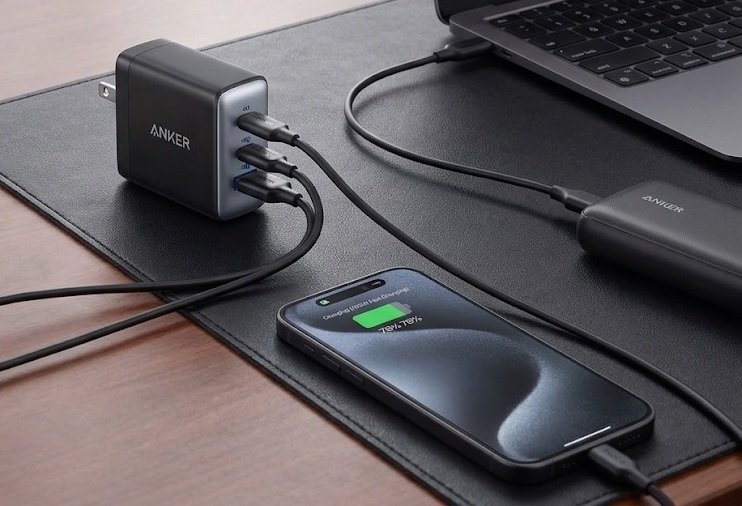
Anker 737 Charger (GaNPrime 120W) – Best Overall Choice
The Anker 737 GaNPrime 120W is the recommended pick for charging multiple devices fast. Its GaN technology delivers up to 120W across three ports, powering a phone to 50% in roughly 20 minutes. The compact design and smart power distribution make it ideal for travel and daily desk use.
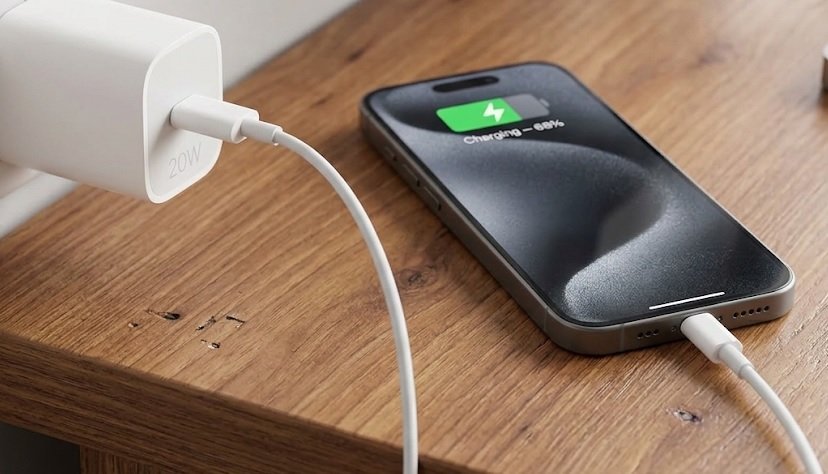
Apple 20W USB-C Power Adapter – Best Option for iPhone
For iPhone users, the Apple 20W USB-C Power Adapter is the safest fast-charging option. It supports USB Power Delivery and enables 50% charge in about 30 minutes on iPhone 8 and newer. Genuine Apple certification protects battery health and avoids compatibility warnings.
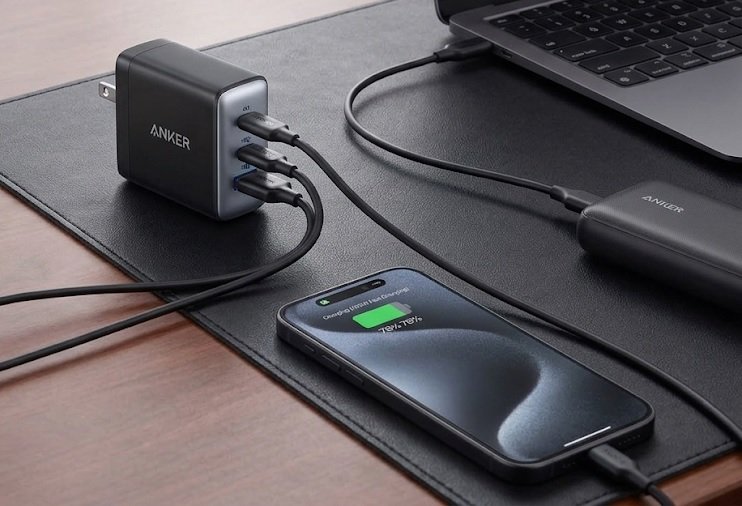
Anker 765 USB-C to Lightning Cable – Best Durable Cable
The Anker 765 USB-C to Lightning Cable is ideal for iPhone fast charging with lasting durability. It supports 20W Power Delivery, is MFi-certified, and rated for 35,000 bends. Its reinforced build handles daily wear far better than cheap generic cables.
How to Charge Your Phone Faster: Proven Methods That Work
Charging speed depends on three things: the charger, the cable, and your phone’s settings. Fixing all three is the fastest route to a full battery.
Use the Right Charger and Cable Combo
Your phone only charges as fast as its weakest link allows. A 120W charger paired with a cheap cable delivers standard speeds, not fast charging.
- Match wattage: Use a charger meeting your phone’s maximum supported power.
- Check protocols: USB Power Delivery (PD) and Qualcomm Quick Charge must match your device.
- Avoid generic cables: Damaged or low-quality cables block fast-charging entirely.
Enable Airplane Mode While Charging
Radios drain power constantly, slowing your charge. Turning them off redirects energy into the battery.
- Enable Airplane Mode from quick settings.
- Close background apps and disable Bluetooth.
- Keep the screen off during charging.
This simple habit can cut charging time by up to 30%.
Charge Directly From a Wall Outlet
Wall outlets deliver stable, high-wattage power that USB ports cannot match. Laptop and car USB ports often cap output well below fast-charging thresholds.
| Power Source | Typical Output | Speed |
|---|---|---|
| Wall charger (PD) | 20W–120W | Fastest |
| Laptop USB port | 5W–15W | Slow |
| Car USB port | 5W–12W | Slow |
Quick Summary
- Match charger wattage and cable to your phone.
- Airplane mode speeds charging by up to 30%.
- Wall outlets beat USB and car ports every time.
How to Charge a Phone Faster Without Damaging the Battery
Speed means nothing if it shortens your battery’s lifespan. These habits protect long-term battery health while you charge quickly.
Avoid Extreme Heat While Fast Charging
Heat is the number one killer of lithium-ion batteries. Fast charging generates warmth, so never charge under a pillow or in direct sunlight.
- Remove thick cases during fast charging to release heat.
- Never charge above 35°C — sustained heat permanently reduces capacity.
- Skip charging while gaming, since heavy load plus charging doubles heat output.
Follow the 20–80 Rule for Battery Longevity
Lithium-ion batteries age fastest at full charge and deep discharge. Keeping your phone between 20% and 80% dramatically extends its usable life.
- Enable Optimized Battery Charging in your phone settings.
- Unplug once you hit 80% during the day.
- Avoid overnight charging on cheap, uncertified chargers.
Use Certified Chargers and Avoid Overnight Charging
Uncertified chargers often lack proper voltage regulation, risking both battery damage and safety hazards. Look for USB-IF or MFi certification before buying.
| Habit | Battery Impact |
|---|---|
| Charging 20–80% | Extends lifespan |
| Overnight on cheap charger | Accelerates wear |
| Charging in heat | Permanent damage |
Quick Summary
- Heat above 35°C causes permanent battery damage.
- Staying between 20–80% extends battery lifespan.
- Certified chargers protect both speed and safety.
Fast Charging Myths and Common Mistakes to Avoid
Plenty of charging advice online is outdated or simply wrong. Clearing up these myths helps you charge faster without harming your battery.
Myth: Overnight Charging Ruins Your Battery
Modern phones stop drawing power once they hit 100%. The real risk is heat buildup and keeping the battery at full voltage for hours.
- Truth: Overnight charging is safe on certified chargers.
- Better: Use optimized charging to pause at 80% until morning.
- Avoid: Charging under pillows or thick bedding.
Myth: Closing Apps Speeds Up Charging
Force-closing apps barely affects charging speed. What actually drains power is background activity, GPS, and screen brightness.
- Lower screen brightness or turn the display off.
- Disable GPS, Bluetooth, and Wi-Fi if unused.
- Stop navigation and video streaming while charging.
Myth: Any Cable Charges Just as Fast
Cable quality directly limits charging speed. Thin or damaged cables restrict current, so your fast charger performs like a slow one.
| Myth | Reality |
|---|---|
| Overnight charging kills batteries | Safe if heat is controlled |
| Closing apps speeds charging | Minimal impact |
| All cables are equal | Cable quality limits speed |
Quick Summary
- Overnight charging is safe when heat is managed.
- Background activity drains more than open apps.
- Low-quality cables throttle fast charging.
Fast Charging by Phone Brand: What Works for iPhone and Android
Fast charging standards differ across brands. Using the right charger for your specific phone unlocks maximum speed and protects battery health.
Fast Charging an iPhone Safely
iPhones from the iPhone 8 onward support USB Power Delivery fast charging. You need a USB-C to Lightning cable and a 20W or higher adapter.
- Best speed: 20W–30W USB-C PD adapter reaches 50% in about 30 minutes.
- Battery care: Enable Optimized Battery Charging in Settings.
- Avoid: Uncertified Lightning cables that trigger warnings.
Fast Charging Android Phones
Android fast charging varies by manufacturer and protocol. Samsung uses Super Fast Charging, while brands like Xiaomi and OnePlus push proprietary standards.
- Check your phone’s supported wattage in the specs.
- Use the manufacturer’s original charger for proprietary standards.
- Confirm USB PD or Quick Charge compatibility for third-party options.
Wireless vs Wired Charging Speed
Wired charging is always faster and generates less heat. Wireless charging is convenient but typically caps at 15W and loses efficiency as heat.
| Method | Typical Speed | Heat |
|---|---|---|
| Wired USB-C PD | 20W–120W | Moderate |
| Wireless (MagSafe/Qi2) | 7.5W–15W | Higher |
Quick Summary
- iPhones need USB-C PD and 20W+ for fast charging.
- Android speed depends on brand-specific protocols.
- Wired charging beats wireless for speed and heat.
How to Charge Your Phone Faster in an Emergency
Sometimes you only have minutes before you need to leave. These emergency charging tricks squeeze the most power into the shortest time window.
Quick Steps to Maximize Charge in 10 Minutes
Every minute counts when you are in a rush. Cutting power drain while charging is the fastest way to gain usable battery percentage.
- Plug into a wall outlet with your highest-wattage charger.
- Enable Airplane Mode immediately.
- Turn off the screen and close heavy apps.
- Remove the phone case to prevent heat buildup.
- Unplug at 80% if time allows.
Best Settings for Fast Emergency Charging
Your phone’s software settings directly influence charging speed. Disabling power-hungry features redirects energy into the battery.
- Lower brightness to the minimum or turn off the display.
- Disable GPS, Bluetooth, and Wi-Fi when not needed.
- Stop navigation and streaming — they drain faster than charging adds.
What to Avoid During Emergency Charging
Certain habits cancel out your fast-charging gains entirely. Avoid them to get the most from every minute plugged in.
- Gaming or video calls — heat and load slow charging.
- Cheap cables — they throttle current to a trickle.
- Car USB ports — low output wastes precious time.
| Action | Effect on Speed |
|---|---|
| Airplane Mode on | Up to 30% faster |
| Screen off | Notably faster |
| Gaming while charging | Much slower |
Quick Summary
- Airplane Mode plus screen off is fastest in a pinch.
- Disable GPS, Bluetooth, and Wi-Fi to cut drain.
- Avoid gaming and cheap cables during emergencies.
Signs Your Battery or Charger Is Slowing You Down
Sometimes slow charging is not your fault. A worn battery or failing charger quietly caps your speed no matter what you do.
How to Check Battery Health on iPhone and Android
Battery health reveals whether your phone can still accept fast charging. Once capacity drops below 80%, charging slows noticeably.
- iPhone: Go to Settings → Battery → Battery Health & Charging.
- Android: Check Settings → Battery → Battery Health, or use Samsung Members.
- Warning sign: “Service Recommended” means it is time for a replacement.
When to Replace Your Charger or Cable
Chargers and cables wear out over time. Fraying, bent connectors, or a charger that runs hot are clear replacement signals.
- Inspect cables for fraying or exposed wires.
- Test the charger with another device to isolate the problem.
- Replace any charger that overheats or charges inconsistently.
Why Your Phone Charges Slowly: Quick Diagnosis
Most slow-charging complaints trace back to one of a few common causes. Working through this checklist usually solves the problem fast.
| Symptom | Likely Cause |
|---|---|
| Charges slowly on all chargers | Worn battery |
| Slow only with one cable | Damaged cable |
| Hot charger, slow speed | Failing adapter |
| Slow after update | Software or thermal throttling |
Quick Summary
- Battery health below 80% slows charging.
- Frayed cables and hot chargers need replacing.
- Isolate the cause by testing one part at a time.
Long-Term Battery Care Habits That Keep Charging Fast
Fast charging only stays fast if your battery remains healthy. These daily habits preserve capacity and speed for years.
Temperature Control: The Golden Rule of Battery Care
Lithium-ion batteries degrade fastest when exposed to heat. Keeping your phone cool during charging protects both speed and lifespan.
- Charge in cool, ventilated spaces — never in direct sun.
- Remove thick cases while fast charging.
- Never leave phones in hot cars, even when powered off.
Smart Charging Habits for Daily Use
Small routine changes add up to significantly longer battery life. Consistency matters more than any single trick.
- Keep your battery between 20% and 80% when possible.
- Enable Optimized Battery Charging on your device.
- Avoid deep discharges below 10%.
- Use certified chargers and quality cables every time.
When to Replace Your Battery Instead
No habit can reverse a chemically worn battery. Replacement becomes the smarter choice once health drops below 80%.
- Battery health under 80% — capacity loss is permanent.
- Frequent shutdowns at 20–30% charge.
- Rapid drain even after a full charge.
| Habit | Long-Term Benefit |
|---|---|
| 20–80% charging | Slower capacity loss |
| Cool charging | Protects cell chemistry |
| Certified chargers | Stable voltage, less wear |
Quick Summary
- Heat control is the most important battery habit.
- 20–80% charging slows long-term capacity loss.
- Replace batteries below 80% health.
Conclusion: How to Charge a Phone Faster Without Damaging the Battery
Charging fast and protecting your battery are not conflicting goals. The right charger, cable, and settings deliver speed safely.
Remember the essentials: match your charger wattage, avoid heat, and stay between 20–80%. These proven methods keep charging quick and batteries healthy.
Start applying these tips today. Your battery will thank you for years.
Charge smarter, not harder — and enjoy every extra minute of power.
Frequently Asked Questions about Charging a Phone Faster Safely
What is the fastest way to charge a phone without damaging the battery?
The fastest safe method is using your phone’s maximum supported wattage charger with a certified cable, while enabling Airplane Mode and turning off the screen. This combination maximizes speed while keeping heat low.
Heat is the real battery killer, not speed itself. As long as your phone stays cool and you use certified accessories, fast charging causes no meaningful long-term damage.
Does fast charging really damage your battery?
No, fast charging does not damage batteries when done correctly. Modern phones use smart chips that regulate voltage and temperature, preventing harmful conditions during high-wattage charging.
The damage comes from heat and cheap accessories, not charging speed. Using certified chargers and avoiding hot environments keeps your battery healthy even with daily fast charging.
Should I turn off my phone while charging to charge faster?
Yes, powering off your phone speeds up charging noticeably. With no background processes, radios, or screen activity, all incoming power goes directly into the battery.
If you cannot power off, Airplane Mode is the next best option. It can reduce charging time by up to 30% while keeping your phone usable.
Is it bad to charge your phone overnight?
Overnight charging is safe on modern phones with certified chargers. Devices stop drawing power once they reach 100%, preventing overcharging.
The real concern is heat and full-voltage stress. Enable optimized charging and avoid charging under pillows or thick bedding to minimize battery wear.
Why is my phone charging so slowly all of a sudden?
Sudden slow charging usually points to a damaged cable, a failing charger, or debris in the charging port. Try a different certified cable and adapter to isolate the cause.
If speed stays slow across all chargers, check battery health. Capacity below 80% or software thermal throttling can permanently limit charging speed.
Does wireless charging damage your battery faster than wired?
Wireless charging generates more heat than wired charging, which can accelerate battery wear over time. It also charges slower, typically capped between 7.5W and 15W.
Occasional wireless charging is fine. For daily fast charging and better battery longevity, wired USB-C Power Delivery remains the recommended option.
What is the best battery percentage to keep your phone at?
Keeping your phone between 20% and 80% is ideal for battery longevity. Lithium-ion cells age fastest at full charge and deep discharge.
You do not need to be perfect. Just avoid frequent overnight charging to 100% and deep drains below 10% to significantly extend battery lifespan.
Can I use a higher-wattage charger than my phone supports?
Yes, you can safely use a higher-wattage charger. Your phone only draws the power it is designed to accept, so a 120W charger will not overload a 20W phone.
The phone and charger negotiate power delivery automatically. Just ensure the charger supports your phone’s fast-charging protocol for maximum speed.