
Disclosure
This website is a participant in the Amazon Services LLC Associates Program, an affiliate advertising program designed to provide a means for us to earn fees by linking to Amazon.com and affiliated sites.
Learning how to water a flooded battery properly extends its lifespan by years and restores lost capacity. Using distilled water and the right technique prevents permanent plate damage and keeps your battery running at peak performance.
This complete guide covers the tools you need, safe step-by-step filling methods, and expert tips for checking electrolyte levels. Keep reading to master proven methods that protect your investment and avoid costly mistakes.
Key Takeaways
- Use distilled water only — tap water minerals destroy battery plates.
- Fill each cell to 1/8 inch above the plates, never to the top.
- Water after charging, when electrolyte levels are lowest.
- Wear safety goggles and gloves — electrolyte contains sulfuric acid.
- Check levels monthly to catch low water before damage occurs.
Best Products for Watering a Flooded Battery – Detailed Comparison
EZ Red EZ1000 Battery Watering System – Best Overall Choice
The EZ Red EZ1000 is the recommended choice for anyone learning how to water a flooded battery properly. Its single-hand gravity flow design fills each cell to the exact level automatically, preventing overfilling. The translucent bottle shows water levels instantly, making it ideal for beginners and professionals alike.

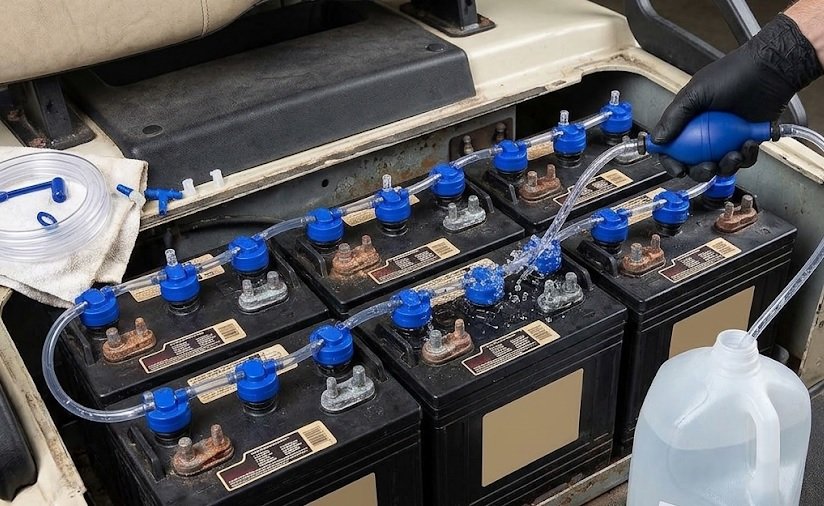
Flow-Rite MP-2000 Pro-Fill Battery Watering System – Best for Multi-Battery Banks
The Flow-Rite MP-2000 Pro-Fill is the best option for golf carts, RVs, and solar banks with multiple batteries. This manifold-based system waters every cell simultaneously through quick-connect tubing. It eliminates the risk of acid splash and cuts watering time by up to 80%, making maintenance effortless.
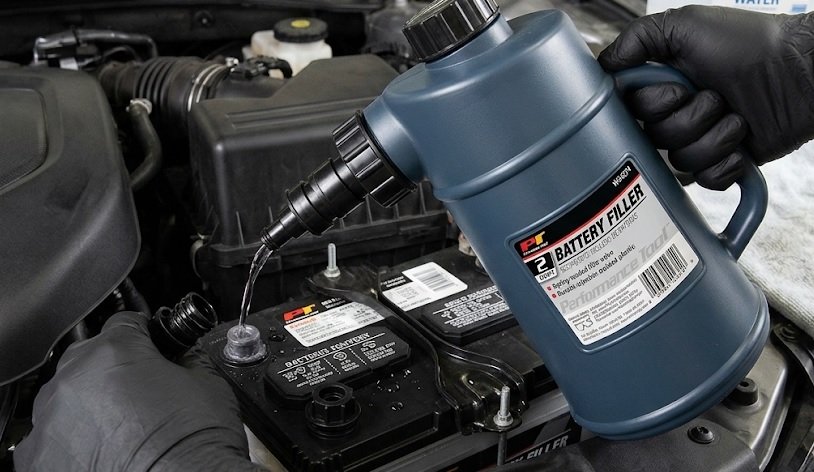
Plews 75-030 Battery Filler – Best Budget Option
The Plews 75-030 offers a simple, affordable way to top off flooded batteries safely. Its self-regulating nozzle stops flow at the correct level, and the 2-quart capacity handles most automotive batteries in one fill. An ideal entry-level pick for occasional maintenance.
When and Why to Water a Flooded Battery
Flooded lead-acid batteries lose water through evaporation and electrolysis during charging. Watering restores the electrolyte balance and prevents plate exposure, which causes permanent capacity loss.
Signs Your Battery Needs Water
- Exposed plates: Visible lead plates above the electrolyte line
- Low fluid in one or more cells: Uneven levels signal evaporation
- Slow cranking or reduced runtime: Weak electrolyte weakens performance
How Often Should You Check Water Levels?
Check your flooded battery every 4 to 8 weeks under normal use. Hot climates, heavy charging, and frequent deep discharges accelerate water loss, so monthly checks are safer.
| Condition | Check Frequency |
|---|---|
| Moderate climate, light use | Every 8 weeks |
| Hot climate or daily use | Every 4 weeks |
| Golf cart / solar bank | Every 2–4 weeks |
Why Timing Matters
Always water after charging, never before. Charging expands the electrolyte, so filling beforehand risks overflow and acid spill during the charge cycle.
Quick Rules
- Check every 4–8 weeks
- Water only after charging
- Never let plates dry out
Step-by-Step Guide: How to Water a Flooded Battery Safely
Proper technique prevents acid burns, overfilling, and plate damage. Follow these proven steps for safe, effective battery maintenance.
Tools and Safety Gear You Need
- Distilled water: Never use tap or mineral water
- Safety goggles and rubber gloves: Protect against sulfuric acid
- Funnel or battery filler bottle: Controls flow precisely
- Baking soda: Neutralizes accidental acid spills
Watering Steps in Order
- Turn off and disconnect the charger and any loads.
- Clean the battery top to stop dirt entering cells.
- Pry off vent caps and inspect each cell’s electrolyte level.
- Add distilled water until it reaches 1/8 inch above the plates.
- Replace caps and wipe away any spills.
- Recharge fully to mix the electrolyte evenly.
Common Mistakes to Avoid
Overfilling is the most frequent error. Excess water expands during charging and pushes acid out, corroding terminals and reducing capacity.
- Filling before charging: Causes overflow
- Using tap water: Minerals shorten battery life
- Filling to the very top: Leaves no room for expansion
Pro Tips
- Use only distilled water
- Fill to 1/8 inch above plates
- Always water after charging
How Much Water to Add and Troubleshooting Common Issues
Getting the water level right is critical for battery health. Too little exposes plates, while too much causes acid overflow during charging.
How Much Water Does Each Cell Need?
Most cells need 2 to 4 ounces of distilled water per watering session. Severely depleted batteries may require more, so add slowly and recheck levels.
| Cell Condition | Water Needed |
|---|---|
| Plates barely exposed | 1–2 oz |
| Plates half exposed | 2–4 oz |
| Plates fully exposed | 4+ oz, add gradually |
Why One Cell Takes More Water Than Others
Uneven water consumption signals a problem. A cell that consistently needs more water may have a cracked casing, internal short, or excessive heat. Monitor it closely and test with a hydrometer.
Common Problems and Fixes
- Battery won’t hold a charge: Plates may be sulfated from past dry-out
- Acid boiling or bubbling: Overcharging — check voltage regulator
- White crusty terminals: Acid overflow — clean with baking soda paste
- Persistent low cell: Internal damage — replace the battery
What If You Overfill?
Overfilled cells push electrolyte out during charging, corroding terminals and surrounding surfaces. If you overfill, remove excess with a clean turkey baster before recharging.
Key Points
- Add 2–4 oz per cell, slowly
- Uneven levels signal damage
- Remove excess before charging
Essential Maintenance Tips After Watering a Flooded Battery
Watering alone isn’t enough. Pairing it with smart maintenance habits maximizes battery life and keeps performance consistent.
Keep Terminals and Casing Clean
Dirt and corrosion create parasitic drains and hide cracks. Wipe the casing with a damp cloth and clean terminals using a baking soda and water paste.
- Inspect for cracks: Small leaks worsen over time
- Tighten connections: Loose terminals cause voltage drops
- Apply terminal protectant: Prevents future corrosion
Charge Correctly to Reduce Water Loss
Overcharging boils off water fast. Use a smart charger with voltage regulation and avoid leaving batteries on high-amperage charge for extended periods.
Store Flooded Batteries Properly
For seasonal storage, charge fully, check water levels, and store in a cool, dry place. Recharge every 4 to 6 weeks to prevent sulfation.
Track Water Usage Over Time
Record how much water each cell takes at every check. Rising consumption points to aging or a failing charger — early detection saves money.
| Maintenance Task | Frequency |
|---|---|
| Check water levels | Every 4–8 weeks |
| Clean terminals | Every 3 months |
| Full equalizing charge | Every 1–3 months |
| Hydrometer test | Every 6 months |
Maintenance Essentials
- Clean terminals every 3 months
- Use a voltage-regulated charger
- Track water usage per cell
Safety Precautions When Watering Flooded Batteries
Battery electrolyte contains sulfuric acid, a corrosive substance that burns skin and eyes on contact. Following strict safety protocols protects you and those around you.
Personal Protective Equipment You Must Wear
- Safety goggles: Sealed eyewear, not regular glasses
- Rubber or nitrile gloves: Acid-resistant protection
- Old clothing and closed shoes: Avoid exposed skin
Ventilation and Fire Hazards
Charging batteries release hydrogen gas, which is highly explosive. Always water and charge in a well-ventilated area away from sparks, flames, and smoking materials.
What to Do If Acid Contacts Skin or Eyes
- Flush immediately with cool running water for 15 minutes.
- Remove contaminated clothing while rinsing.
- Seek medical attention for eye contact or large spills.
- Neutralize floor spills with baking soda, then rinse.
Handling and Disposal Rules
Never lean over a battery while adding water, and never store distilled water in unlabeled containers. Old batteries require recycling at authorized centers — never household trash.
| Hazard | Prevention |
|---|---|
| Acid burns | Goggles, gloves, long sleeves |
| Hydrogen explosion | Ventilation, no sparks or flames |
| Acid spills | Baking soda on hand |
Safety Essentials
- Wear goggles and gloves always
- Work in ventilated areas only
- Flush acid contact for 15 minutes
Watering Flooded Batteries in Different Applications
Watering needs vary by battery type and use case. Understanding your specific application prevents underfilling and extends service life.
Automotive and Marine Batteries
Standard car batteries typically require watering every 3 to 6 months. Marine batteries endure vibration and deep cycling, so check them monthly during boating season.
- Access caps carefully: Some are hidden under labels
- Check after long trips: Heat accelerates evaporation
- Test specific gravity: Confirms electrolyte strength
Golf Cart and RV Battery Banks
Golf carts and RVs use multiple 6V or 8V batteries wired together. Water each battery individually, and consider a single-point watering system to save time.
Solar and Off-Grid Storage Banks
Solar banks undergo daily deep cycling, causing rapid water loss. In hot climates, check levels every 2 to 4 weeks and use a hydrometer monthly.
| Application | Check Frequency |
|---|---|
| Automotive | Every 3–6 months |
| Marine | Monthly in season |
| Golf cart / RV | Every 2–4 weeks |
| Solar bank | Every 2–4 weeks |
Industrial and Forklift Batteries
Industrial batteries often use automatic watering systems. Manual checks still matter — verify float levels weekly and log every fill for compliance.
Application Tips
- Marine and solar need monthly checks
- Water each battery individually
- Log fills for industrial compliance
How to Tell When a Flooded Battery Is Beyond Saving
Even with perfect watering, flooded batteries eventually wear out. Recognizing the end signs saves you time and prevents unreliable power.
Physical Warning Signs
- Warped or bulging casing: Indicates internal heat damage
- Cracked case or leaking acid: Unsafe and unrecoverable
- Persistently dry cells: Plates likely sulfated permanently
Performance Red Flags
A battery that drains within hours of a full charge, or refuses to hold voltage above 12.4V after resting, is failing. Repeated slow cranking despite proper watering confirms decline.
Testing Tools That Confirm Failure
| Tool | What It Reveals |
|---|---|
| Hydrometer | Cell-specific gravity differences |
| Multimeter | Resting and charging voltage |
| Load tester | Real-world capacity under demand |
Cell Voltage Comparison Test
Measure each cell with a hydrometer. A variation above 0.050 specific gravity between cells means internal damage. No amount of water will fix a shorted or sulfated cell.
When to Replace Instead of Water
Replace the battery if it fails a load test, shows physical damage, or has one dead cell. Continuing to water a failing battery wastes effort and risks equipment damage.
Replacement Signals
- Bulging case or acid leaks
- One dead or shorted cell
- Fails load test after full charge
Conclusion: Mastering How to Water a Flooded Battery Properly
Watering a flooded battery correctly is simple once you know the rules. Use distilled water, fill to 1/8 inch above the plates, and always water after charging.
Consistent monthly checks and proper safety gear prevent damage and extend battery life by years. Never skip maintenance — small habits deliver big savings.
Grab your distilled water and safety goggles today, then inspect your battery this week. Your equipment will thank you with reliable, long-lasting power.
Frequently Asked Questions About Watering a Flooded Battery
What is the best way to water a flooded battery?
The best way is to add distilled water only after fully charging the battery. Fill each cell until the liquid sits 1/8 inch above the lead plates.
Use a funnel or battery filler bottle for precise control. Replace vent caps securely and wipe away any spills to prevent corrosion.
Can I use tap water for a flooded battery?
No, never use tap water. It contains minerals, chlorine, and salts that contaminate the electrolyte and damage battery plates over time.
Always use distilled or deionized water, which is free of impurities. Tap water shortens battery life significantly, even in small amounts.
How do I know if my flooded battery needs water?
Remove the vent caps and look inside each cell. If the lead plates are visible above the electrolyte, the battery needs water immediately.
Also watch for slow cranking, reduced runtime, or a hot casing during charging. Check levels every 4 to 8 weeks to catch problems early.
Should I water a battery before or after charging?
Always water after charging, never before. Charging expands the electrolyte, so pre-filling risks overflow and acid spills.
If plates are exposed before charging, add just enough water to cover them, then charge fully and top off afterward.
What happens if I overfill a flooded battery?
Overfilling causes electrolyte to expand and overflow during charging. This corrodes terminals, damages surrounding surfaces, and reduces capacity.
If you overfill, remove excess fluid with a clean turkey baster before recharging. Never leave cells filled to the very top.
How much water should I add to each cell?
Most cells need 2 to 4 ounces per watering session. Add slowly and recheck levels between pours to avoid overfilling.
Severely depleted cells may need more, but add gradually. Uneven consumption across cells often signals internal damage.
Why does one cell use more water than the others?
A single cell consuming more water usually indicates a cracked casing, internal short, or excessive heat in that cell.
Test with a hydrometer to compare specific gravity. If one cell consistently lags, the battery is likely failing and needs replacement.
Is it safe to water a battery while it is charging?
No, avoid watering during charging. Hydrogen gas is present and explosive, and electrolyte expansion can cause overflow.
Turn off and disconnect the charger first. Water the battery, then recharge to mix the electrolyte evenly.