
Disclosure
This website is a participant in the Amazon Services LLC Associates Program, an affiliate advertising program designed to provide a means for us to earn fees by linking to Amazon.com and affiliated sites.
You can check if a battery is charging without special tools by watching for indicator lights, feeling for gentle warmth, or testing the device’s performance after a short charge. These proven methods work on phones, laptops, cars, and rechargeable batteries.
This complete guide covers simple, expert tips to verify charging status using everyday items you already own. Keep reading to learn each method, spot warning signs, and confirm your battery is truly charging.
Key Takeaways
- Indicator lights and screen icons give the fastest charging confirmation.
- Gentle warmth near the battery signals active charging within 10–15 minutes.
- A rising battery percentage after 20 minutes confirms a working charge.
- No light, no warmth, and no percentage change means the charger or cable failed.
- Voltage checks with a basic multimeter verify charging when no display exists.
Best Tools for Checking If a Battery Is Charging – Detailed Comparison
While this guide focuses on tool-free methods, a few affordable devices make battery charging checks faster and more accurate. Here are three recommended options worth owning.
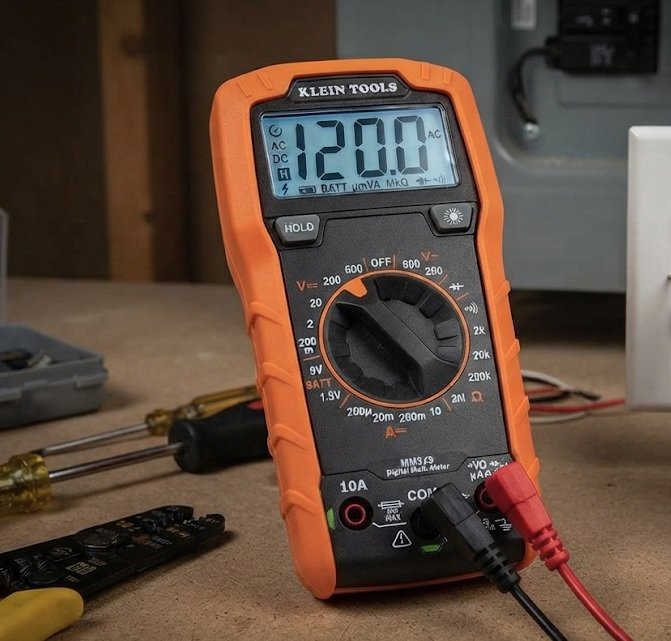
Klein Tools MM325 Multimeter – Best Overall Choice
The Klein Tools MM325 is the best option for anyone who wants precise voltage readings. It measures DC voltage up to 600V with auto-ranging accuracy, letting you confirm a charger’s output instantly. Ideal for car batteries, power tool packs, and laptop chargers, it delivers professional-grade results at a budget price.
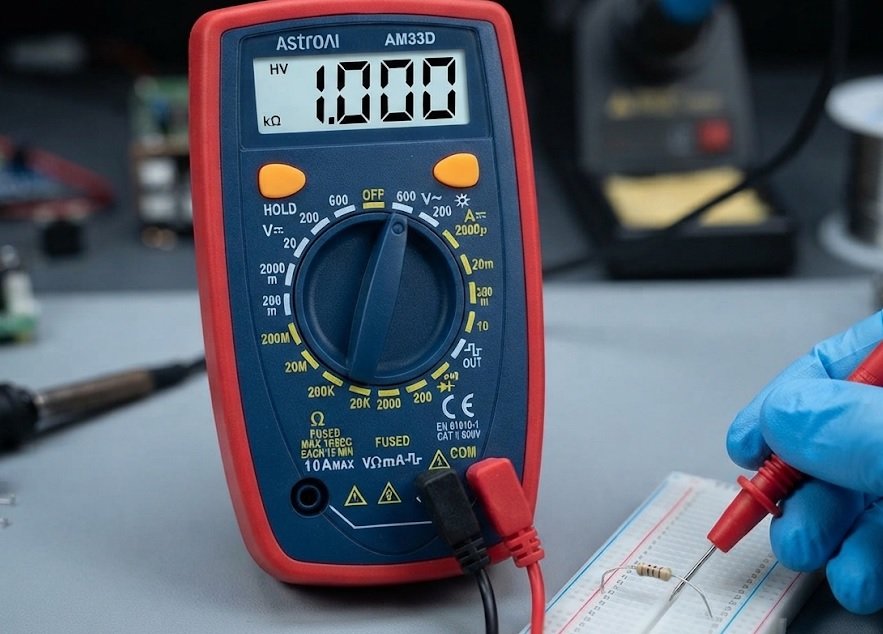
Etekcity Digital Multimeter MSR-R500 – Best Budget Pick
The Etekcity MSR-R500 offers reliable voltage and continuity testing for under $20. Its large LCD display and simple dial make it ideal for beginners checking whether a battery is receiving current. Recommended for household batteries, phone chargers, and small electronics, it’s a practical starter tool.
ANCEL BA101 Car Battery Tester – Best for Vehicles
The ANCEL BA101 is purpose-built for 12V car batteries, showing voltage, cranking amps, and charge status in seconds. It’s the best option for drivers who want to verify alternator output and battery health without a mechanic. Compact and easy to read, it fits neatly in any glovebox.

How to Tell If a Battery Is Charging Using Simple Visual and Physical Signs
Most devices give you clear feedback the moment charging begins. Learning these signals helps you confirm power flow in seconds, with no equipment required.
Watch for Indicator Lights and Screen Icons
A charging light or on-screen battery icon is the quickest confirmation. On phones, look for a lightning bolt symbol inside the battery icon. On laptops, a small LED near the charging port typically glows amber or white.
- Solid light: Charging is active and stable.
- Blinking light: Often means a loose cable or low power input.
- No light: Check the connection before assuming failure.
Feel for Gentle Warmth
Batteries warm up slightly during charging due to internal chemical reactions. After 10–15 minutes, touch the device near the battery compartment.
- Slight warmth: Normal and expected.
- No warmth at all: Charging may not be occurring.
- Excessive heat: Unplug immediately — this signals a fault.
Quick Check Summary
- Light or icon = charging confirmed
- Gentle warmth after 15 minutes = normal
- No signs at all = test cable and port
Observe Battery Percentage Changes
Percentage is the most reliable everyday indicator. Note the level, wait 20 minutes, and check again.
- Record the starting percentage.
- Leave the device undisturbed.
- Confirm the number has risen.
A rising percentage proves the battery is genuinely charging. If it drops or stays flat, the charger, cable, or port needs attention.
How to Check If a Battery Is Charging When There Are No Indicator Lights
Some batteries and chargers offer no lights, screens, or icons. These situations require indirect testing methods that reveal power flow through performance and behavior.
Test Device Performance After a Short Charge
Power the device on after charging for 15–20 minutes. If it runs longer or stronger than before, the battery is receiving charge.
- Phones: Boot time and screen brightness improve.
- Power tools: Motor spins faster with more torque.
- Flashlights: Beam appears noticeably brighter.
Swap Components to Isolate the Problem
If no signs appear, test each part of the charging chain. This simple process identifies the faulty component fast.
- Try a different cable.
- Use another wall adapter or USB port.
- Test the battery in a second device.
If the battery charges elsewhere, the original charger is the culprit. If nothing works, the battery itself may be dead.
Check for Heat and Magnetic Fields
Wireless chargers emit a faint magnetic field you can detect with a small compass. Place the compass near the charging pad — needle movement confirms active power.
| Sign | What It Means |
|---|---|
| Compass needle moves | Charger is powered |
| Gentle warmth | Energy transferring |
| No reaction | Check alignment or outlet |
No-Light Checklist
- Test performance after 20 minutes
- Swap cable, adapter, and device
- Use a compass for wireless pads
These indirect checks confirm charging even when visual cues are missing entirely.
How to Verify Charging on Car, Phone, and Rechargeable Batteries
Different battery types show charging status in unique ways. Matching your method to the battery type saves time and prevents false conclusions.
Car Battery Charging Checks Without Tools
A car battery rarely has a visible charge indicator. Instead, watch for these behavioral signs.
- Dome lights brighten when the charger connects.
- Headlights glow stronger after 30 minutes.
- Engine cranks faster than before.
Slow cranking after hours of charging points to a failing battery or weak alternator. A simple voltage reading with the Klein Tools MM325 confirms it in seconds.
Phone and Laptop Battery Charging Indicators
Smart devices offer the clearest feedback of all. Swipe down to the status bar or open system settings to view live charging data.
- Open Settings → Battery.
- Look for “Charging” or a lightning icon.
- Confirm the percentage is climbing.
If the icon appears but the percentage falls, a background app or faulty cable is draining power faster than it enters.
Rechargeable AA and AAA Battery Checks
Standard rechargeable cells give almost no visual feedback. Use the warmth test and a quick performance check instead.
| Battery Type | Best No-Tool Check |
|---|---|
| Car battery | Light brightness test |
| Phone/laptop | Settings battery screen |
| AA/AAA cells | Warmth plus device test |
Type-Specific Tips
- Cars: watch lights and cranking speed
- Phones: trust the settings screen
- AA/AAA: combine warmth and performance
Choosing the right check for your battery type delivers a confident answer every time.
Common Reasons a Battery Is Not Charging and How to Fix Them
When every check fails, the problem usually lies in one of a few predictable places. Working through them in order saves time and avoids unnecessary replacements.
Faulty Cables and Damaged Connectors
Cables fail far more often than batteries do. Bending and daily wear break the tiny wires inside, leaving the outer sheath intact.
- Frayed ends: Replace the cable immediately.
- Loose fit: Clean the port with a wooden toothpick.
- Bent pins: Straighten gently or swap the cable.
Try a known-working cable first — it solves most charging problems instantly.
Weak Power Adapters and Outlets
A charger that is too weak cannot push current into a large battery. Fast-charging phones need higher-wattage adapters to show any gain.
- Plug the charger into a different outlet.
- Test with a higher-wattage adapter.
- Remove extension cords and USB hubs.
The Etekcity MSR-R500 confirms whether an adapter still outputs correct voltage.
Extreme Temperatures and Battery Age
Lithium batteries refuse to charge below 0°C (32°F) or above 45°C (113°F) for safety. Move the device to room temperature and retry.
| Problem | Quick Fix |
|---|---|
| Faulty cable | Swap with a known-good cable |
| Weak adapter | Use a higher-wattage charger |
| Cold or hot battery | Warm or cool to room temperature |
| Aged battery | Replace the battery |
Troubleshooting Order
- Swap the cable first
- Test a stronger adapter
- Normalize temperature
- Replace aged batteries
Following this order resolves nearly every no-charge complaint without special tools.
Safety Tips When Testing a Battery Without Tools
Every method above is safe when done carefully. These precautions protect you, your device, and the battery from avoidable damage.
Avoid Touching Terminals and Exposed Wires
Metal terminals can carry enough current to cause burns or short circuits. Keep fingers and jewelry away from exposed contacts at all times.
- Remove rings and watches before handling car batteries.
- Never bridge terminals with tools or metal objects.
- Dry your hands before touching chargers or ports.
A short circuit can spark instantly and damage both the battery and the charger.
Recognize Warning Signs of a Failing Battery
Stop charging immediately if you notice any of these danger signals.
- Swelling or bulging: Internal damage has occurred.
- Hissing or popping: Pressure is building inside.
- Burning smell: Overheating or chemical leakage.
- Extreme heat: Far beyond gentle warmth.
Move a swollen battery outdoors, away from anything flammable, and recycle it properly.
Follow Basic Charging Best Practices
Good habits prevent most charging failures before they start.
- Use the original charger whenever possible.
- Charge on a hard, ventilated surface.
- Unplug once the battery reaches 100%.
- Avoid charging overnight on soft bedding.
| Warning Sign | Action |
|---|---|
| Gentle warmth | Normal — continue |
| Swelling | Stop and recycle |
| Burning smell | Unplug and ventilate |
Safety Essentials
- Keep metal away from terminals
- Stop at swelling, heat, or smell
- Charge on hard, open surfaces
These habits keep every battery check safe and reliable.
Quick Step-by-Step Guide to Confirm Any Battery Is Charging
This final walkthrough combines every method into one simple sequence. Follow the steps in order and you will have a confident answer within minutes.
The Universal Five-Step Charging Check
Start with the fastest visual signals, then move to physical and performance tests.
- Look for a light or icon — the fastest confirmation.
- Wait 15 minutes and feel for gentle warmth.
- Note the percentage and check it again after 20 minutes.
- Test performance by powering the device on.
- Swap the cable and adapter if nothing changes.
Most batteries reveal their status at step one or two. The remaining steps handle stubborn cases.
Matching the Fastest Method to Your Battery
Different batteries respond best to different checks. Use this quick reference to skip straight to the right test.
| Battery/Device | Fastest Check | Time Needed |
|---|---|---|
| Smartphone | Battery icon in settings | Instant |
| Laptop | LED near charging port | Instant |
| Car battery | Headlight brightness | 30 minutes |
| AA/AAA cells | Warmth plus device test | 20 minutes |
| Wireless devices | Compass needle movement | Instant |
What to Do If Nothing Works
If all five steps fail, the battery is likely dead or the charging port is damaged.
- Test the battery in another device to isolate the fault.
- Inspect the port for lint, corrosion, or bent pins.
- Try a different charger with matching specifications.
- Replace the battery if it is over three years old.
Five-Step Recap
- Check lights and icons first
- Feel for warmth after 15 minutes
- Confirm percentage rises
- Test real performance
- Swap cable and adapter last
This sequence answers the question for virtually any battery you own.
Frequently Confused Charging Scenarios Explained
Some charging behaviors look like problems but are actually normal. Understanding these common scenarios prevents unnecessary worry and wasted troubleshooting.
Battery Charges Slowly or Stops at 80%
Many phones deliberately pause at 80% to extend battery lifespan. This is a feature, not a fault.
- Optimized charging: Delays the final 20% until you wake up.
- Heat protection: Slows charging when the device is warm.
- Weak adapter: Genuinely slow charging from low wattage.
Check your battery settings before assuming the charger is broken.
Percentage Drops While Plugged In
A falling percentage during charging almost always means power use exceeds power input. Demanding apps, hot environments, or weak chargers cause this.
- Close heavy background apps.
- Turn on airplane mode briefly.
- Switch to a higher-wattage charger.
If the percentage still drops, the cable or port is likely damaged.
Battery Shows Charging but Never Reaches 100%
An aged battery loses capacity and may never hit full charge again. This is normal after several years of use.
| Scenario | Likely Cause | Solution |
|---|---|---|
| Stops at 80% | Optimized charging feature | Normal — no action |
| Drops while plugged in | High power use | Close apps, stronger charger |
| Never reaches 100% | Aged battery | Replace the battery |
| Charges then stops randomly | Loose cable or port | Reseat or replace cable |
Normal vs. Faulty
- 80% stop = smart feature
- Falling percentage = power drain
- Never full = aged battery
Recognizing these patterns saves you from replacing parts that work perfectly fine.
Conclusion: Simple Ways to Check If a Battery Is Charging
You now know several reliable ways to check if a battery is charging without special tools. Lights, warmth, percentage changes, and performance tests cover nearly every situation.
Start with the fastest visual check, then move to physical and performance signs. This order solves most problems in minutes.
Try these methods on your devices today. Share this guide with anyone frustrated by charging issues.
With these simple checks, you will always know whether your battery is truly charging.
Frequently Asked Questions About Checking If a Battery Is Charging
How can I tell if my phone battery is charging without looking at the screen?
Feel the back of the phone after 10–15 minutes of charging. A gentle warmth near the battery area confirms that energy is transferring into the cells.
You can also listen for a charging chime or watch for a brief screen wake when you plug in. Most phones vibrate or light up momentarily to signal a successful connection.
Why does my battery show charging but the percentage is not going up?
This usually means power use is matching or exceeding power input. Heavy background apps, a weak adapter, or a damaged cable are the most common culprits.
Close demanding apps, switch to a higher-wattage charger, and try a different cable. If the percentage still refuses to climb, the charging port may need cleaning or repair.
What is the best way to check a car battery is charging without tools?
Turn on the headlights or interior dome lights while the charger runs. If they glow noticeably brighter than before, the battery is receiving charge.
After 30 minutes, try starting the engine. Faster, stronger cranking confirms real progress. Slow cranking points to a weak battery or a failing alternator that needs professional testing.
Can a battery feel warm but still not be charging?
Yes, this happens occasionally. Heat can come from the charger itself, nearby electronics, or the device running under load rather than from active charging.
Always combine the warmth test with a second signal, such as a rising percentage or an indicator light. Two confirming signs give you a reliable answer.
How long should I wait before confirming a battery is charging?
Give it at least 15–20 minutes for the clearest results. Indicator lights appear instantly, but warmth and percentage changes need a little time to develop.
For car batteries, wait around 30 minutes before judging. Larger batteries charge more slowly, so patience prevents false conclusions.
Why does my laptop battery stop charging at 80 percent?
Many laptops use optimized charging to pause at 80 percent, protecting long-term battery health. This is a deliberate feature, not a malfunction.
Check your manufacturer’s battery settings to confirm the mode is active. You can usually disable it temporarily when you need a full charge before travel.
What should I do if nothing confirms my battery is charging?
Work through the charging chain one piece at a time. Swap the cable, try another adapter, test a different outlet, and inspect the port for lint or damage.
If the battery charges in another device, your original charger is faulty. If nothing works anywhere, the battery itself has likely reached the end of its life.
Is it safe to keep using a battery that gets very hot while charging?
No. Excessive heat signals internal damage or a failing charger and can create a genuine safety risk. Unplug the device immediately and let it cool.
Look for swelling, hissing, or a burning smell. If any appear, move the battery outdoors and recycle it at a proper facility rather than charging it again.