
Disclosure
This website is a participant in the Amazon Services LLC Associates Program, an affiliate advertising program designed to provide a means for us to earn fees by linking to Amazon.com and affiliated sites.
A battery management system (BMS) is the electronic brain that monitors and protects every cell in a battery pack. It keeps lithium-ion batteries safe, balanced, and long-lasting by tracking voltage, current, and temperature in real time.
This complete guide explains how a BMS works, why it matters for EVs and energy storage, and the expert tips that separate good systems from great ones. Read on to understand the technology powering your devices.
Key Takeaways
- 4 core jobs: a BMS monitors, protects, balances, and reports battery health.
- Safety first: it prevents overheating, overcharging, and over-discharging.
- Cell balancing extends pack lifespan by equalizing voltage across cells.
- EVs, phones, and solar storage all rely on a BMS to run safely.
- Smart BMS units add Bluetooth monitoring and real-time data alerts.
Best Battery Management Systems for DIY and EV Projects – Detailed Comparison
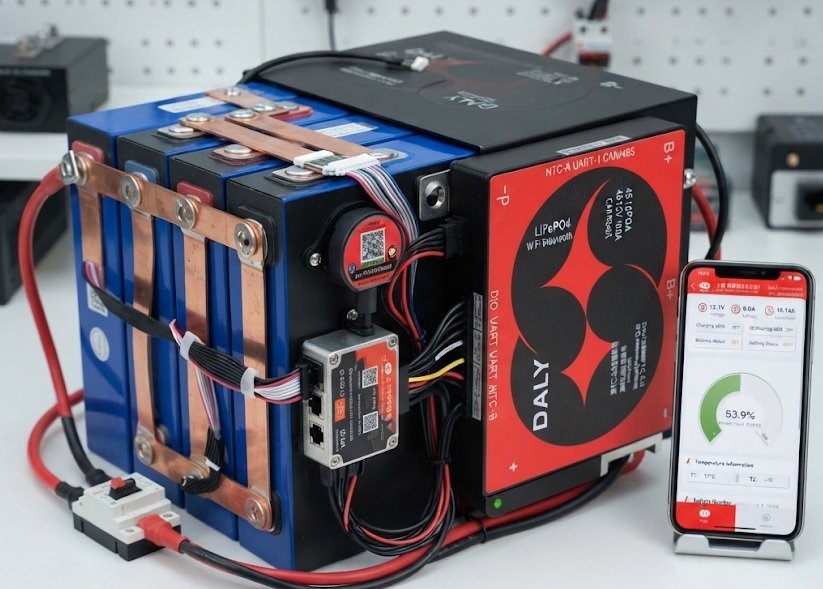
Daly Smart BMS 4S 12V 100A – Best Overall Choice
The Daly Smart BMS 4S 12V 100A is the recommended pick for most DIY lithium builds. It handles 100A continuous discharge, supports 4S LiFePO4 packs, and includes Bluetooth monitoring via a free app. Its proven reliability and low price make it ideal for solar storage and camper setups.
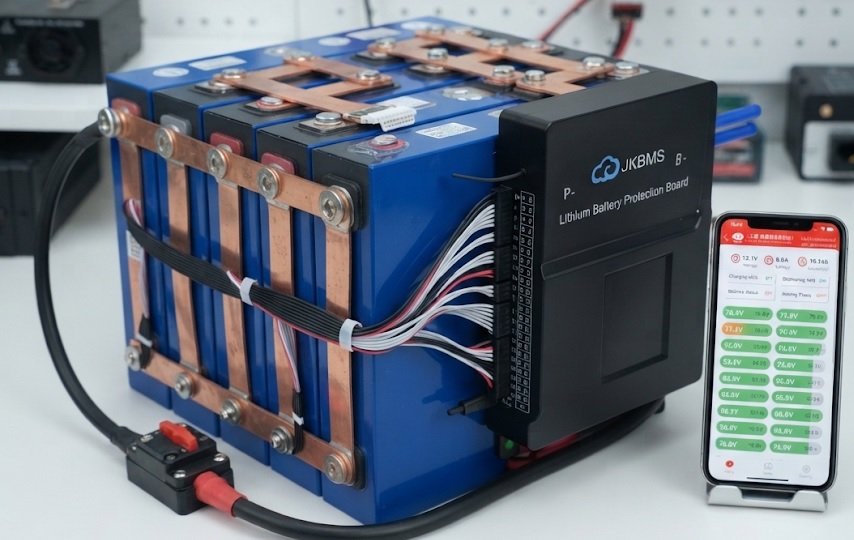
JK BMS B2A24S15P – Best for High-Performance Packs
The JK BMS B2A24S15P supports up to 24S configurations with 150A continuous current and active balancing. It is the best option for serious EV conversions and large home battery banks. Built-in 2A active balancing keeps cells tightly matched, extending pack lifespan significantly.
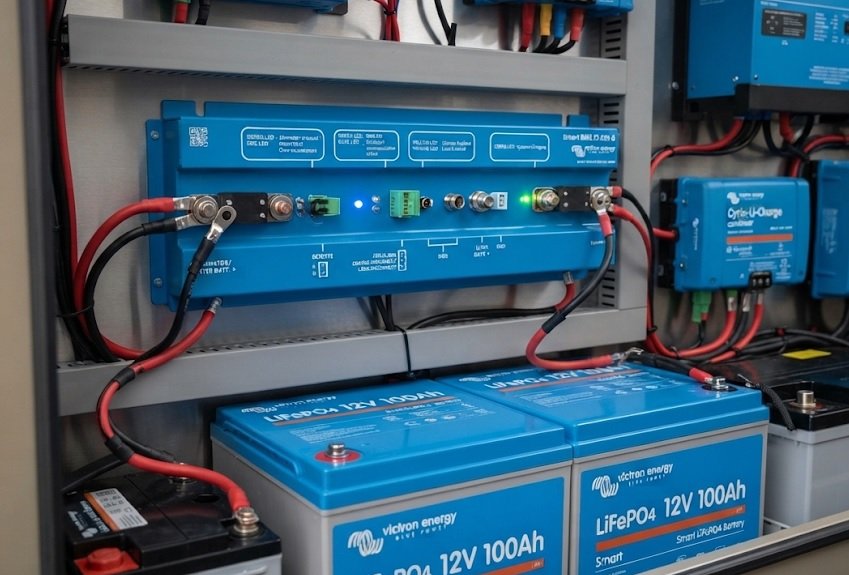
Victron Energy Smart BMS 12-200 – Best for Marine and Off-Grid
The Victron Energy Smart BMS 12-200 is ideal for marine, RV, and off-grid systems using Victron lithium batteries. It manages 200A loads, integrates with the Victron ecosystem, and offers reliable charge/discharge control. Its rugged build suits harsh environments where dependability matters most.
How Does a Battery Management System Work in Simple Terms?
A BMS works like a security guard for your battery pack. It constantly checks each cell and steps in the moment something goes wrong. This round-the-clock monitoring is why lithium batteries remain safe and efficient.
The Four Core Functions of a BMS
Every battery management system performs four essential jobs:
- Monitoring: Tracks voltage, current, and temperature across every cell.
- Protection: Cuts power during overcharge, over-discharge, or overheating.
- Balancing: Equalizes cell voltages so no single cell wears out early.
- Reporting: Sends data to apps, dashboards, or chargers.
How Cell Balancing Works Step by Step
Cells drift apart over time, and the weakest cell limits the whole pack. Balancing fixes this in two ways:
- Passive balancing: Burns excess energy from higher cells as heat.
- Active balancing: Moves energy from strong cells to weak ones.
Active balancing is more efficient but costs more. Passive balancing is simpler and common in budget systems.
Why Temperature Monitoring Matters
Heat is the number one killer of lithium batteries. A BMS uses thermistors to detect hot spots and shuts down charging before damage occurs.
Quick Summary
- A BMS monitors, protects, balances, and reports.
- Active balancing transfers energy; passive burns it off.
- Temperature sensors prevent overheating failures.
Why a Battery Management System Matters for Safety and Lifespan
Without a BMS, a lithium battery pack is an accident waiting to happen. The system prevents the failures that cause fires, swelling, and sudden death. It also stretches pack life from months to many years.
Key Safety Risks a BMS Prevents
Lithium cells fail in predictable ways when unmanaged:
- Overcharging: Pushes voltage too high, causing heat and fire risk.
- Over-discharging: Drops voltage too low, permanently damaging cells.
- Overheating: Triggers thermal runaway in extreme cases.
- Short circuits: Cuts current instantly to stop damage.
How a BMS Extends Battery Lifespan
Balanced cells age evenly, so the pack lasts longer. A good BMS also limits charge rates and depth of discharge, two proven lifespan boosters.
BMS vs. No BMS: Quick Comparison
| Factor | With BMS | Without BMS |
|---|---|---|
| Safety | Protected | High risk |
| Lifespan | Extended | Shortened |
| Cell balance | Maintained | Drifts |
| Monitoring | Real-time data | None |
Quick Summary
- A BMS prevents fires, swelling, and cell death.
- Balancing and charge limits extend pack lifespan.
- Unmanaged packs fail faster and pose real danger.
Types of Battery Management Systems Explained
Not all battery management systems are built the same. They range from simple protection boards to smart units with wireless monitoring. Choosing the right type depends on your budget and application.
1. Basic Protection BMS
These boards handle only the essentials: overcharge, over-discharge, and short-circuit protection. They are affordable and ideal for small 12V packs and budget builds. However, they offer no data or balancing intelligence.
2. Smart BMS with Bluetooth
Smart units add real-time monitoring through a phone app. You can view cell voltages, temperature, and state of charge at a glance. Features typically include:
- Bluetooth or UART connectivity for live data
- Adjustable parameters for custom charge limits
- Data logging to track long-term battery health
3. Active Balancing BMS
Active balancers move energy between cells instead of wasting it as heat. This keeps packs tightly balanced and is best for large EV or solar banks. They cost more but deliver superior efficiency.
Which Type Should You Choose?
| Type | Best For | Cost |
|---|---|---|
| Basic Protection | Small DIY packs | Low |
| Smart Bluetooth | Solar, RVs, monitoring | Medium |
| Active Balancing | EVs, large banks | High |
Quick Summary
- Basic BMS units protect but do not monitor.
- Smart BMS adds apps, data, and adjustable limits.
- Active balancing suits large, high-value packs.
How to Choose the Right Battery Management System
Picking the wrong BMS can ruin your pack or waste money. The right choice depends on your battery chemistry, voltage, and current needs. Follow these steps to match a BMS to your build.
Step-by-Step Selection Process
- Match the cell count: A 4S pack needs a 4S BMS (e.g., 4S for 12V LiFePO4).
- Check continuous current: Choose a rating above your peak load.
- Confirm chemistry: LiFePO4, Li-ion, and LTO need different voltage limits.
- Decide on features: Pick smart or active balancing if you need monitoring.
Key Specs to Compare
These ratings determine whether a BMS fits your system:
- Voltage: Must match your pack’s nominal voltage.
- Continuous current: Should exceed your typical draw by 20-30%.
- Balance current: Higher amps equal faster cell balancing.
- Communication: Bluetooth, UART, or CAN for data access.
Common Mistakes to Avoid
Many beginners oversize or undersize their BMS. Undersizing causes overheating shutdowns, while oversizing wastes money. Always leave a safety margin and never exceed the rated current.
| Spec | What to Check |
|---|---|
| Series count | Match your cell count exactly |
| Current rating | Add 20-30% headroom |
| Chemistry | Set correct voltage limits |
Quick Summary
- Match series count and chemistry first.
- Add 20-30% current headroom for safety.
- Choose smart features only if you need them.
Real-World Applications of Battery Management Systems
Battery management systems power far more than phones and laptops. They are essential in electric vehicles, solar storage, and industrial equipment. Each application demands different BMS priorities.
BMS in Electric Vehicles and E-Bikes
EV packs contain hundreds of cells that must stay perfectly balanced. The BMS manages fast charging, regenerative braking, and thermal control. It also communicates with the vehicle’s computer for range and health data.
BMS in Solar and Home Energy Storage
Solar battery banks charge and discharge daily, stressing cells constantly. A BMS protects against deep discharge and coordinates with inverters. Smart models let homeowners monitor state of charge from a phone.
BMS in Portable Electronics and Power Tools
Even small devices rely on basic protection boards. These prevent overcharge in phones, laptops, and cordless drills. Without them, lithium cells would fail within weeks.
Common Applications at a Glance
| Application | BMS Priority |
|---|---|
| Electric vehicles | High current, thermal control |
| Solar storage | Deep-cycle protection, monitoring |
| Power tools | Compact protection, cost |
| Marine/RV | Durability, integration |
Quick Summary
- EVs need high-current BMS with thermal control.
- Solar systems rely on deep-cycle protection.
- Small devices use basic protection boards.
Battery Management System Maintenance and Troubleshooting Tips
A BMS needs occasional attention to keep working reliably. Most problems stem from wiring errors, loose connections, or wrong settings. Regular checks prevent small issues from becoming expensive failures.
Routine Maintenance Checklist
Follow these simple habits to keep your BMS healthy:
- Inspect wiring: Check balance leads for looseness or corrosion.
- Verify cell voltages: Confirm all cells stay within a tight range.
- Update firmware: Smart BMS units often release fixes and features.
- Clean terminals: Remove dust and moisture buildup.
Common BMS Problems and Fixes
Most issues have straightforward solutions:
- BMS won’t turn on: Check balance lead connections and cell voltage.
- Pack cuts out under load: Current rating may be too low.
- Cells stay unbalanced: Balance current may be too weak.
- App won’t connect: Reset Bluetooth or reinstall the app.
When to Replace Your BMS
Replace the unit if it repeatedly shuts down or shows erratic readings. Physical damage or burnt components are clear warning signs. A failing BMS risks the entire pack, so never ignore these signals.
| Symptom | Likely Cause |
|---|---|
| No power | Loose balance leads |
| Cuts out under load | Undersized current rating |
| Unbalanced cells | Weak balance current |
Quick Summary
- Inspect wiring and cell voltages regularly.
- Most faults trace back to connections or sizing.
- Replace a BMS showing damage or erratic behavior.
Future Trends in Battery Management System Technology
BMS technology is advancing rapidly alongside the electric revolution. Tomorrow’s systems will be smarter, safer, and more integrated than today’s units. These trends will shape how we store and use energy.
Smarter AI and Predictive Analytics
Next-generation BMS units use AI to predict failures before they happen. Machine learning analyzes usage patterns to optimize charging and extend lifespan. This shifts maintenance from reactive to predictive.
Wireless and Cloud-Connected BMS
Manufacturers are dropping messy wiring harnesses for wireless cell monitoring. Cloud connectivity enables remote fleet management and over-the-air updates. Key emerging features include:
- Wireless cell monitoring to reduce wiring complexity
- Cloud dashboards for remote diagnostics
- OTA firmware updates for continuous improvement
- Fleet analytics for commercial EV operators
Integration with Second-Life and Recycling
Used EV batteries are finding new life in stationary storage. Advanced BMS units adapt to aging cells and track remaining capacity. This supports the growing circular economy for batteries.
Emerging Trends at a Glance
| Trend | Impact |
|---|---|
| AI analytics | Predictive maintenance |
| Wireless BMS | Simpler installations |
| Cloud connectivity | Remote management |
| Second-life support | Sustainability |
Quick Summary
- AI enables predictive maintenance and optimization.
- Wireless and cloud BMS simplify management.
- Second-life support boosts sustainability.
Conclusion: Why a Battery Management System Is Essential
A battery management system protects your investment and keeps lithium packs safe. It monitors, balances, and extends lifespan in every serious application.
The key takeaway is simple: never run a lithium pack without a BMS. Choose one that matches your chemistry, voltage, and current needs.
Ready to build? Pick the right BMS, wire it carefully, and monitor it regularly.
With the right system in place, your battery will deliver years of reliable, worry-free power.
Frequently Asked Questions about Battery Management Systems
What is a battery management system in simple terms?
A battery management system is an electronic control board that monitors and protects every cell in a battery pack. It tracks voltage, current, and temperature to keep the pack safe and efficient.
Think of it as a guardian that prevents overcharging, over-discharging, and overheating. Without it, lithium packs would fail quickly and pose serious safety risks.
Do I really need a BMS for my lithium battery?
Yes, you should always use a BMS with lithium batteries. Lithium cells are sensitive to voltage extremes and heat, which can cause fires or permanent damage.
A BMS is not optional for safety. Even small DIY packs benefit from basic protection and cell balancing to maximize lifespan.
What is the difference between active and passive balancing?
Passive balancing burns excess energy from higher-voltage cells as heat. Active balancing transfers that energy to weaker cells instead of wasting it.
Active balancing is more efficient but costs more. Passive balancing is simpler, cheaper, and fine for most small and mid-sized packs.
How do I choose the right BMS for my battery pack?
Match the series count to your cell count, such as 4S for a 12V LiFePO4 pack. Then pick a continuous current rating 20-30% above your peak load.
Confirm the chemistry matches your cells and decide if you need smart features. Always leave a safety margin to avoid overheating shutdowns.
Why does my BMS keep cutting power under load?
Your BMS is likely undersized for the current your system draws. When current exceeds the rated limit, the BMS shuts off to protect the cells.
Check your peak load and compare it to the BMS rating. If the rating is too low, upgrade to a higher-current unit.
Can a BMS extend my battery’s lifespan?
Yes, a quality BMS significantly extends battery lifespan. It keeps cells balanced, limits charge rates, and prevents deep discharge, all of which reduce wear.
Balanced cells age evenly, so the whole pack lasts longer. Proper protection can turn a short-lived pack into one lasting many years.
What is the best way to maintain a battery management system?
Inspect wiring and balance leads regularly for looseness or corrosion. Verify that all cell voltages stay within a tight, healthy range.
Update firmware on smart units and keep terminals clean. Replace the BMS immediately if it shows damage or erratic readings.
Are smart BMS units worth the extra cost?
Smart BMS units are worth it if you want real-time monitoring and control. Bluetooth apps let you view cell voltages, temperature, and state of charge instantly.
For simple budget builds, a basic protection board may suffice. For EVs, solar, and large banks, smart features pay off through better diagnostics.